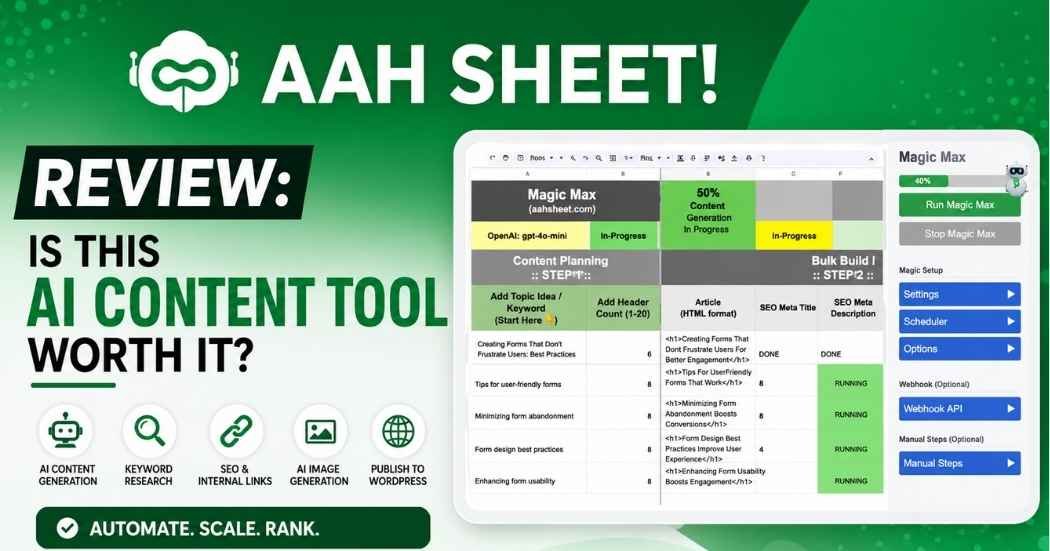
If you’ve ever bounced between five tabs just to write one blog post, you know the problem. Keyword research in one app. Writing in another. Images somewhere else. Then a manual copy-paste job into WordPress at the end.
This AahSheet review looks at what happens when someone tries to fold all of that into Google Sheets instead. I’ll walk through the features, the pricing, what real AppSumo buyers are saying, and who this tool actually fits. This AahSheet Review 2026 is based on the current public listing and product details, not hands-on testing, so I’ll flag anything that can’t be independently verified.
AahSheet Overview
AahSheet is an AI-powered system built inside Google Sheets. It’s designed to automate content creation, SEO research, scraping, and publishing. Right now, it’s sold as a lifetime deal on AppSumo, which is where most of the buyer feedback in this AahSheet review comes from.
The tool leans toward bloggers, ecommerce sellers, freelancers, and marketers who need volume. AppSumo’s listing shows integrations with WordPress, Shopify, NeuronWriter, and Make. That tells you the target user: somewhere between a solo blogger and a small agency running several sites.
What sets AahSheet apart isn’t the AI. It’s the spreadsheet. Keywords, prompts, drafts, URLs, and product data all live in rows and columns you can sort and reuse. No more scattering everything across a dozen browser tabs.
What Is AahSheet?
Strip away the marketing, and AahSheet is a set of pre-built Google Sheets templates connected to AI functions. You’re not opening a new app. You’re working inside a spreadsheet you probably already use.
That structure means keyword research, content generation, URL analysis, scraping, image creation, and internal linking can all happen in one place. AahSheet also supports Bring Your Own AI Key, or BYOK. Instead of being locked into one AI provider, you connect your own credentials. Current options include OpenAI, Claude, Google, and Grok. The Pro tier adds OpenRouter access, which opens the door to models like Llama and Perplexity.
This matters if you’re weighing an AahSheet lifetime deal purchase. You pay once for the tool, then pay your own AI provider for usage. That’s usually cheaper at scale than an all-in-one subscription with built-in AI credits.

How Does AahSheet Work?
The basic workflow is simple on paper. You drop keywords, URLs, or product data into a sheet. Then you run AahSheet’s built-in functions against that data.
Say you have fifty keywords for an affiliate site. AahSheet can research each one, draft content, pull images, and push the finished piece toward your website. All from spreadsheet rows, not fifty separate writing sessions. AppSumo describes this as 16+ Google Sheet tools, plus an Autopilot Mode for scheduled jobs.
None of this replaces editorial judgment. It just clears the busywork out of your way.
Key Features
The feature list is long, so this AahSheet review breaks each one down separately rather than lumping them together.
AI Content Creation
AahSheet turns your spreadsheet into a content production line. Instead of writing one article in a document editor, you structure tasks across rows. Each row can be a keyword, topic, or product.
The BYOK setup matters most here. Because you use your own AI key, AahSheet claims unlimited content generation. The real limit becomes your API usage and budget, not a monthly cap set by AahSheet.
Key benefits:
- A spreadsheet workflow that scales with your keyword list.
- Several AI model options depending on the task.
- No AahSheet-imposed content cap when you bring your own key.
One honest caveat: a spreadsheet doesn’t fix bad prompting. Output quality still depends on your prompts, your chosen model, and how much editing you do afterward.
Bulk SEO Content Generation
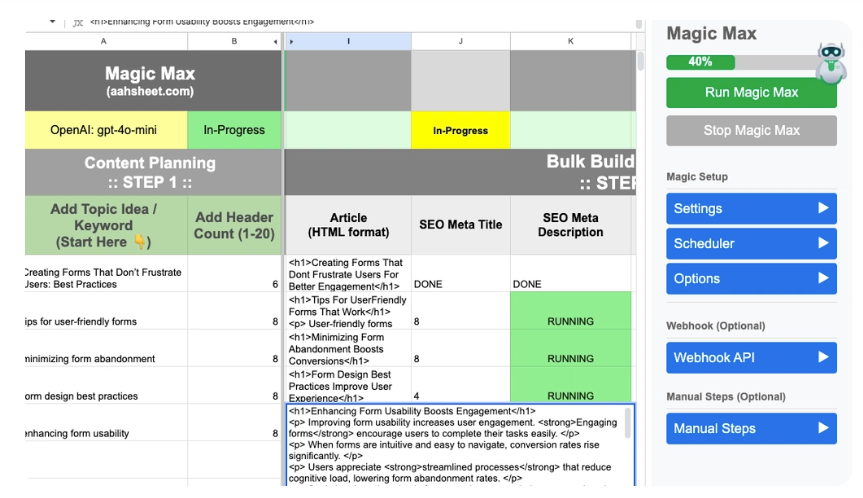
This is probably the biggest reason people buy this tool. Instead of writing content one piece at a time, you load a batch of keywords into the sheet and run them through a workflow together.
For affiliate sites with hundreds of product pages, that difference adds up fast. So does it for agencies juggling several client sites. AppSumo positions AahSheet around this kind of scale, not around writing one polished essay.
One caveat worth repeating: bulk generation makes it easy to publish more content. It also makes it easy to publish more mediocre content if nobody checks the output first.
Autopilot Mode
Autopilot Mode covers two workflows: Magic Max and Blog Refresh. Both are built to handle scheduling and site analysis without manual triggers.
Publishers who need a steady stream of new content will find real value here. Set the schedule once and let the sheet run.
Automation removes friction, not responsibility. Letting a scheduled job publish AI content straight to a live site, with no human review, is how factual errors slip through unnoticed.
Blog Refresh
Old content quietly loses rankings if nobody touches it. Blog Refresh analyzes existing articles and flags the ones that need an update.
Manually auditing a few hundred older posts isn’t realistic for most people. Having a tool scan the archive and surface candidates saves real time.
This is one of the more practical features on the list. Content refreshes tend to get skipped in favor of writing something new. Automating the “go check your old stuff” step is a smart use of AI.
Keyword Research
Keyword research sits inside the same workflow as content generation. It doesn’t live in a separate tool you have to tab between.
That matters more than it sounds. When keywords move straight from research into a content brief, you lose fewer details. You also save time on repetitive projects.
Key benefits:
- Keyword research and content creation share one workspace.
- Fewer steps between finding a keyword and publishing around it.
- Useful for teams managing large keyword lists across sites.
Website & Search Scraper
AahSheet includes scraping tools for pulling data from websites and search results. That can help with competitor research, content ideas, or building a dataset for another project.
Scraping is only as good as the judgment behind it. Before running these tools against any site, check that you’re not violating its terms of service or applicable data laws. That responsibility sits with the user, not the tool.
Used carefully, this feature saves time on manual competitor research that would otherwise mean copying data by hand.
URL & Sitemap Scraper
This feature analyzes a site’s URLs or full sitemap. That’s handy for content audits or spotting internal linking gaps.
An SEO professional could run a competitor’s sitemap through this to map their content structure. Or run it on their own site to find thin or duplicate pages worth merging. AahSheet lists sitemap scraping and bulk URL analysis among its core capabilities.
It’s a niche feature next to the content generation tools. But for anyone doing regular site audits, it saves a chunk of manual sitemap-crawling work.
AI Image Generation
Content needs images, and AahSheet includes AI image generation. You’re not exporting to a separate tool for every featured image.
Keeping this inside the same workflow cuts down on the back-and-forth between apps that eats up time on bulk projects. Whether the image quality matches dedicated tools like Midjourney is a fair question. For most affiliate and blog use cases, fast and good enough beats perfect and slow.
Internal Linking
Internal linking helps both search engines and readers navigate a site. Doing it manually across a large site is genuinely painful.
AahSheet automates suggesting and inserting links between related pages. For big sites, this saves real hours. That said, automated links still need a quick human check before publishing. The tool doesn’t always understand context as well as someone who wrote both pages.
WordPress Integration
AahSheet connects directly to WordPress. That lets you push finished content from the sheet to your live site without manually copying and formatting each post.
For bloggers and affiliate marketers publishing in batches, this turns the sheet into something closer to a publishing pipeline than a drafting tool. WordPress integration is listed as a core feature on both AppSumo tiers.
Shopify Integration
Ecommerce sellers get Shopify support, particularly on the higher AppSumo tier. That tier includes product and ecommerce sheet templates.
This is useful for managing product descriptions and SEO metadata at scale. It’s the kind of task that’s tedious one product at a time but works well as a batch job.
Multiple AI Model Support
You’re not locked into one AI provider. Current AppSumo details list support for OpenAI, Claude, Google, and Grok. OpenRouter unlocks more models, like Llama and Perplexity, on the Pro tier.
Different models are better at different tasks. Some write better prose. Others handle structured data better. Having the option to switch is a real advantage over tools that force one model on you.
Bring Your Own AI Key (BYOK)
BYOK changes the economics of the whole tool. Instead of paying AahSheet for AI credits with a monthly ceiling, you connect your own API key and pay your provider directly.
AahSheet states this allows unlimited content generation, since the cap moves from AahSheet’s system to your own usage with whichever AI provider you pick. Worth repeating: unlimited here means unlimited from AahSheet’s side. Your AI provider will still bill you for what you actually use.
Google Sheets Automation
Everything above runs on top of Google Sheets. That’s the real bet AahSheet is making. Structured data in rows and columns, combined with AI functions applied across that data, plays to what spreadsheets already do well.
For anyone who already lives in Google Sheets for content planning, this feels like a natural extension rather than a new habit to build. AahSheet also connects to Zapier or Make for users who want to extend workflows further.
What Users Are Saying
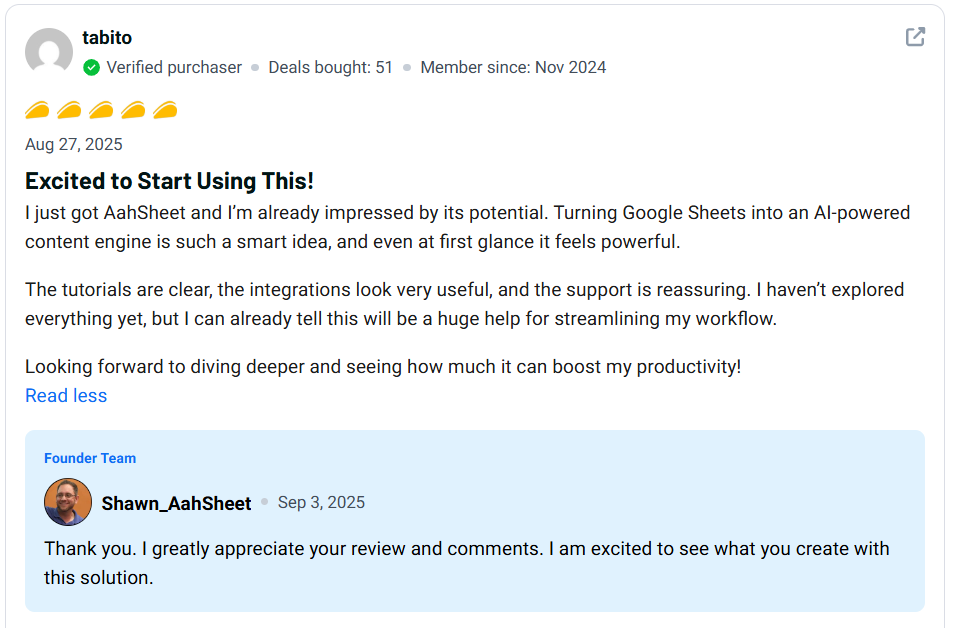
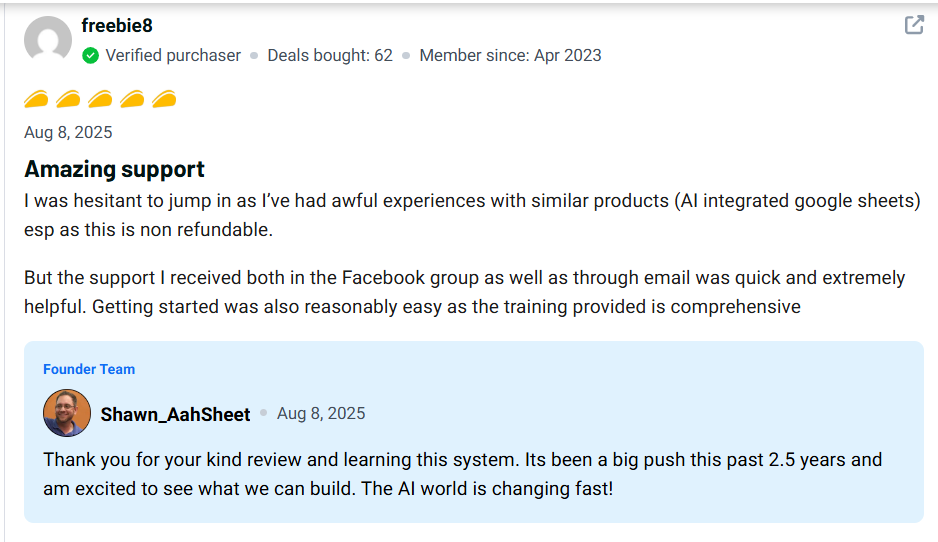
Buyer feedback matters as much as feature lists for any AahSheet review, since it shows how the tool holds up outside a sales page. AahSheet’s AppSumo listing currently shows a 4.9 rating from 57 reviews. That’s 56 five-taco ratings against one one-taco rating. It’s a strongly positive spread, though AppSumo reviewers are self-selected buyers, not a neutral sample.
Positive feedback tends to center on a few recurring points:
- Automation depth across content, SEO, and publishing tasks.
- Integration options with WordPress, Shopify, and other tools.
- Training resources that help new users get oriented.
Common complaints or limitations show up less often, but they’re consistent when they appear:
- The number of sheets and workflows feels overwhelming at first.
- Some buyers needed time working through the training material before feeling comfortable.
That learning curve is the one theme that keeps coming up, even from reviewers who rate the tool highly overall. It’s not a dealbreaker. But it’s not nothing either.
Best Use Cases
- SEO content production from bulk keyword lists.
- Affiliate websites managing large volumes of product pages.
- Blogging operations that need repeatable, scalable workflows.
- Ecommerce stores producing product descriptions at scale.
- WordPress publishing pushed straight from research to live post.
- Shopify content and metadata management.
- Agencies juggling multiple client sites at once.
- Content refresh campaigns across large existing archives.
Who Should Use AahSheet?
- You publish content at real scale, not just a few posts a month.
- You’re already comfortable working inside Google Sheets.
- You manage multiple websites or client accounts.
- You run an SEO-focused or affiliate business.
- You publish through WordPress or Shopify.
- You’re willing to manage your own AI provider key.
- You want workflows you can customize, not a rigid template.
Who Should Avoid AahSheet?
- You only publish a handful of articles each month.
- Spreadsheets make your eyes glaze over.
- You want a simple, single-purpose AI writing box.
- You have no interest in managing your own AI API key.
- You’d rather have an all-in-one platform with a simpler interface.
AahSheet Pros and Cons
Pros
- Deep Google Sheets-based AI workflow.
- Real bulk content generation, not just single-article writing.
- BYOK support with multiple AI model options.
- WordPress and Shopify integration built in.
- Keyword research, scraping, and URL analysis included.
- AI image generation and internal linking tools.
- Autopilot scheduling for recurring content jobs.
- Unlimited websites and user seats on the current offer.
Cons
- Real learning curve, especially early on.
- The number of sheets and workflows can overwhelm beginners.
- BYOK means you manage your own AI costs.
- Smaller sites may never touch half the available features.
- The deal is currently listed as non-refundable.
AahSheet Pricing
Pricing is where every AahSheet review ends up mattering most, since it decides whether the tool is worth trying at all.
Plan | Price | Sheets Included | Best For |
Tier 1 | $59 | 4 | Individuals and smaller projects |
Tier 2 | $189 | 16 | Larger content and ecommerce workflows |
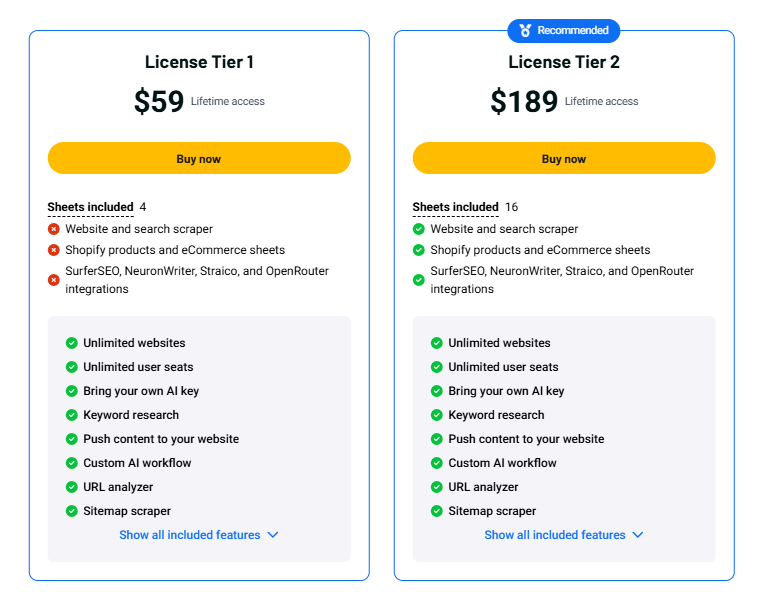
Both tiers include unlimited websites, unlimited user seats, BYOK support, keyword research, WordPress and Shopify integration, URL analysis, sitemap scraping, AI images, and internal linking. Tier 2 adds the website and search scraper, plus Shopify product and ecommerce sheets, on top of everything in Tier 1.
AahSheet AppSumo Lifetime Deal
The AahSheet AppSumo deal gives lifetime access to whichever tier you buy. It includes future updates for the matching Lite or Pro plan, under AppSumo’s standard terms. License activation is required within 60 days of purchase. You can upgrade from Tier 1 to Tier 2 while the offer stays live.
One thing worth flagging clearly: this AahSheet lifetime deal is currently listed as non-refundable and non-downgradable. If you’re on the fence between tiers, read the feature breakdown carefully before checking out. You can’t drop down to a cheaper tier later if Tier 2 turns out to be more than you needed.
Which AahSheet Plan Should You Buy?
- Best for beginners: Tier 1 at $59, to test the workflow before committing further.
- Best for bloggers: Tier 1, unless you’re managing more than a handful of sites.
- Best for SEO professionals: Tier 2, for the added scraping and analysis tools.
- Best for agencies: Tier 2, given the higher sheet count and Shopify features.
- Best for larger content operations: Tier 2, especially if ecommerce content is part of the mix.
If you’re still unsure, compare what you’d actually use. Don’t buy the bigger tier just because it has more capacity sitting unused.
AahSheet vs Alternatives
Feature | AahSheet | Jasper | Make | Zapier |
AI Content Creation | Yes | Yes | Workflow-based | Workflow-based |
Google Sheets Workflow | Yes | Limited | Yes | Yes |
Bulk Content | Yes | Yes | Via automation | Via automation |
SEO Workflows | Yes | Yes | Custom-built | Custom-built |
Scraping | Yes | Limited | Custom-built | Custom-built |
WordPress | Yes | Via integration | Yes | Yes |
Shopify | Yes | Via integration | Yes | Yes |
BYOK | Yes | Varies | Depends on setup | Depends on setup |
AahSheet’s real edge is combining spreadsheet management, AI content, and SEO automation in one place. Make and Zapier are broader automation platforms. You could technically replicate parts of AahSheet with either one, given enough setup time. Jasper leans more toward AI writing and marketing copy than full SEO workflow automation.
Best AahSheet Alternatives
Alternative | Best For | Main Strength | Main Limitation |
Jasper | AI-assisted marketing content | Strong writing quality and brand voice tools | Less built-in SEO and scraping automation |
Make | Custom automation across apps | Highly flexible, connects almost anything | Needs manual setup for content-specific workflows |
Zapier | Simple app-to-app automation | Easiest to learn for basic triggers | Less depth for SEO or bulk content tasks |
Which one fits depends on what matters most to you: writing quality, automation flexibility, or an integrated SEO and content system.
Is AahSheet Easy to Use?
Not if you’ve never opened Google Sheets before. The spreadsheet foundation feels familiar if you already use one regularly. But the sheer number of available workflows can be a lot during your first week.
Reviewers on AppSumo consistently mention this same learning curve. They just as consistently mention that the included training helped them get past it. Spend a few hours on the setup material, and most of that initial overwhelm fades.
Is AahSheet Worth It?
This is the question every AahSheet review is really trying to answer. If your goal is scaling content production, not writing the occasional article, AahSheet earns its price. Bulk generation, keyword research, scraping, image creation, internal linking, and direct publishing all cover more ground than a standalone AI writer.
The real value depends on whether you’ll actually use what’s included. Someone publishing two posts a month pays for automation they’ll never touch. Someone running an affiliate network or agency with a real content backlog gets a tool built exactly for that scale.
Final Verdict
AahSheet is a genuinely interesting option for bloggers, affiliate marketers, SEO professionals, and agencies who want their content operation to live inside Google Sheets. Bulk generation, automation, keyword research, scraping, and BYOK flexibility give it more range than most tools at this price.
The learning curve is real, and I won’t pretend otherwise. This isn’t a one-click AI writer. It’s a system with enough moving parts that you’ll need to invest some time before it clicks. For high-volume publishers, that investment pays off. For someone posting once in a while, a simpler dedicated tool probably makes more sense.
Taken together, this AahSheet review lands on cautious approval. Strong value for scale, unnecessary complexity for casual use. If you fit the first group, the current AahSheet AppSumo deal is worth serious consideration before lifetime pricing potentially changes.
Frequently Asked Questions
What is AahSheet?
AahSheet is an AI-powered Google Sheets system built to automate content creation, SEO research, scraping, and publishing. It runs inside a spreadsheet rather than a standalone app, so keywords, drafts, and workflows all stay in one place.
Is AahSheet good for SEO?
Yes, and this is a point worth stressing in any AahSheet review: SEO is built into the core workflow. Keyword research, internal linking, URL analysis, and bulk content generation are designed to work together, not as separate add-ons.
Can AahSheet generate unlimited content?
AahSheet states that unlimited content generation is possible when you connect your own AI key through BYOK. Your AI provider will still charge based on actual usage, so “unlimited” refers to AahSheet’s own limits, not your API costs.
Does AahSheet work with WordPress?
Yes. WordPress integration is included, so content created in the spreadsheet can be pushed directly to your website without manual copying.
Does AahSheet work with Shopify?
Yes, Shopify and ecommerce functionality are included. Additional product and ecommerce sheet templates are available on Tier 2.
Does AahSheet support different AI models?
Yes. Current listings show support for OpenAI, Claude, Google, and Grok. OpenRouter access adds models like Llama and Perplexity on the Pro tier.
Is AahSheet beginner-friendly?
It’s learnable for beginners, but the number of sheets and workflows creates a real adjustment period. Reviewers frequently mention that the included training makes the learning curve manageable.
Is AahSheet worth buying?
If you produce content at scale and want SEO and publishing automation built into Google Sheets, it’s a strong fit. Occasional content creators will likely get better value from a simpler AI writing tool. That’s the honest takeaway from this AahSheet review.