If you’ve ever tried to go from “I have a book idea” to “I have a finished, publish-ready manuscript,” you know the gap between those two points is where most books die. Not at the idea stage. At the formatting, the cover art, the KDP metadata, and the fortieth revision pass stage.
AIWriteBook is an AI-powered book writing platform that tries to close that gap in one workspace. It handles outlining, chapter drafting in your own voice, character building, illustrations, cover design, and KDP-ready exports, and it’s currently running as a lifetime deal on AppSumo. In this AIWriteBook review, I’ll walk through what it actually does, who it’s built for, what real buyers are saying, and whether the AppSumo pricing makes sense compared to paying for AI writing tools, a cover designer, and a formatter separately.
A quick note before we get into it: this review is built from AIWriteBook’s official AppSumo listing, its public feature comparison table, its founder’s own account of how the product came to be, and 118 verified buyer reviews on AppSumo. I haven’t personally run a manuscript through it, so anywhere I’m making a judgment call rather than reporting a verified fact, I’ll say so directly.
Quick Verdict
Overall rating: 4.7 out of 5 on AppSumo (based on 118 reviews at the time of writing), with a separate 4.6 rating on Trustpilot according to the founders.
Best for: Independent authors, freelance writers, and solopreneurs who want to go from outline to KDP-ready file without stitching together five separate subscriptions.
Biggest advantage: It covers the entire pipeline (outline, chapters, cover, illustrations, export, and even audiobooks on higher tiers) instead of doing just one piece of it.
Biggest drawback: At least one detailed reviewer found the tool prone to hallucinating facts (inventing competitor book titles and authors that don’t exist) and reported that its 20+ “AI tools” aren’t actually wired into the book-writing pipeline the way you’d expect.
Value for money: Strong on paper, since a single lifetime payment replaces several recurring subscriptions. Whether it holds up depends on how much you lean on the parts of the tool that reviewers flagged as inconsistent.
Final recommendation: Worth trying within AppSumo’s 60-day refund window if you’re an author who wants an all-in-one workspace rather than a single best-in-class writing tool. If flawless, fact-checked prose out of the box is non-negotiable for you, read the cons section closely first.
Who Created AIWriteBook?
AIWriteBook was co-founded by Mykyta Chernenko and Artem, according to the founder’s post on the AppSumo listing. Chernenko describes himself as an author first: he wrote his first book “the long, lonely way” before AI tools existed, and his second during the current AI era, which he says gave him a firsthand sense of both what it costs to finish a book alone and what it feels like when AI-generated writing comes back sounding generic.
He and Artem, who he describes as an engineer, built an AI writing pipeline in the summer of 2025 for NanoReads, a reading platform they already ran. They used that pipeline to produce books that went in front of real readers on NanoReads (the founder cites a figure of more than 103,000). That real-world testing is what pushed them to solve what Chernenko calls “the hard part”: keeping an author’s voice consistent through outlining, drafting, and editing, rather than just generating text. A handful of writer friends started using the internal tool, and the company opened it up publicly at the end of 2025.
According to the AppSumo company profile, AIWriteBook was founded on December 31, 2025, is based in London, England, has a team of 1 to 10 people, and is bootstrapped rather than venture-funded. The founders state that more than 1,300 authors and small publishers currently pay for the product and that more than 50,000 books have been written using it. I haven’t independently verified those two figures beyond what’s stated on the listing, so treat them as founder-reported rather than third-party audited.
My Research
For this review, I looked at:
- AIWriteBook’s official AppSumo product page, including its full feature-by-feature pricing comparison table
- The founder’s written explanation of the product’s origin and design philosophy
- 118 buyer reviews on AppSumo, including both praise and a detailed critical review
- Founder responses to individual reviews, which give a decent window into how support actually handles reported bugs
- Current pricing and feature sets for two relevant alternatives, Scrivener and Sudowrite, so the comparison section isn’t just guesswork
What I didn’t do: run my own manuscript through the tool. So anything about output quality is based on what verified buyers reported, not hands-on testing. I’ve flagged that distinction throughout instead of blurring it, because a review that pretends to have “tested” something it didn’t isn’t actually helpful to you.

What Is AIWriteBook?
AIWriteBook is a browser-based AI workspace built specifically for writing and publishing books, rather than a general-purpose AI writing assistant repurposed for long-form content. Its own listing positions it as an alternative to Scrivener, the long-standing desktop app that novelists have used for organizing manuscripts for over a decade.
The core idea is that a book isn’t one task, it’s a pipeline: outline, characters, chapters, editing, cover, formatting, export, and (for nonfiction) references. AIWriteBook tries to keep all of that in a single tab instead of forcing you to jump between a drafting tool, a grammar checker, a cover design tool, and a separate KDP formatting service.
It supports both fiction and nonfiction, and on the higher tiers, it extends into book series, illustrated visual books such as children’s books, cookbooks, and comics, translation into other languages, and audiobook production. It’s aimed squarely at independent authors, freelance writers, and solopreneurs rather than enterprise publishing teams, based on the “Best for” tag on its own listing.
How Does It Work?
Based on the workflow described on the product page, a typical project moves through these stages:
- Train it on your voice. You upload previous writing or an existing manuscript draft, and the system uses it to learn your dialogue style, pacing, and chapter rhythm rather than defaulting to generic AI phrasing.
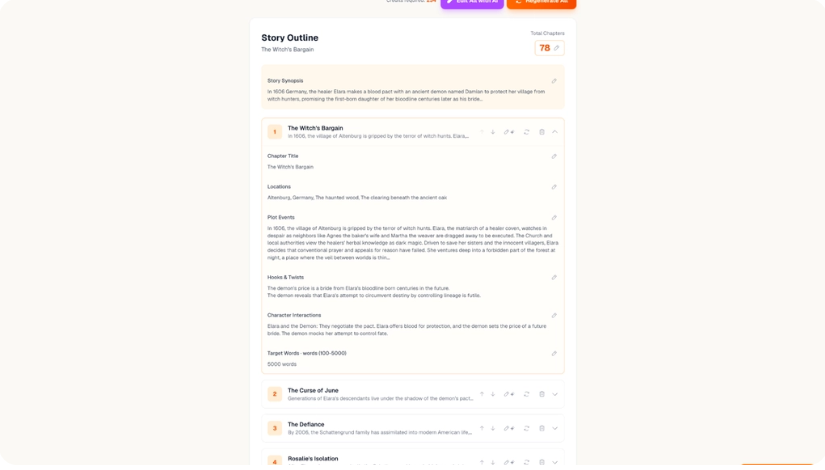
- Build your foundation. You use the character builder to define arcs, backstories, and traits, and the chapter outline builder to plan the book’s structure. For nonfiction, you can attach references and citations at this stage.
- Generate and edit chapters. AIWriteBook drafts chapters based on your outline and style profile. You can edit any paragraph inline, regenerate weak sections, or hand-edit the whole thing.
- Get a second opinion. The chapter-by-chapter AI chat assistant is there for when you’re unsure about pacing or direction rather than just prose quality.
- Illustrate and design. For visual or illustrated books, you generate chapter illustrations and design a cover, with what the listing describes as unlimited cover variations until you land on something you like.
- Export and optimize. You export a KDP-ready EPUB, PDF, or DOCX file, with built-in keyword research, blurb generation, and category selection to help the listing itself perform on Amazon.
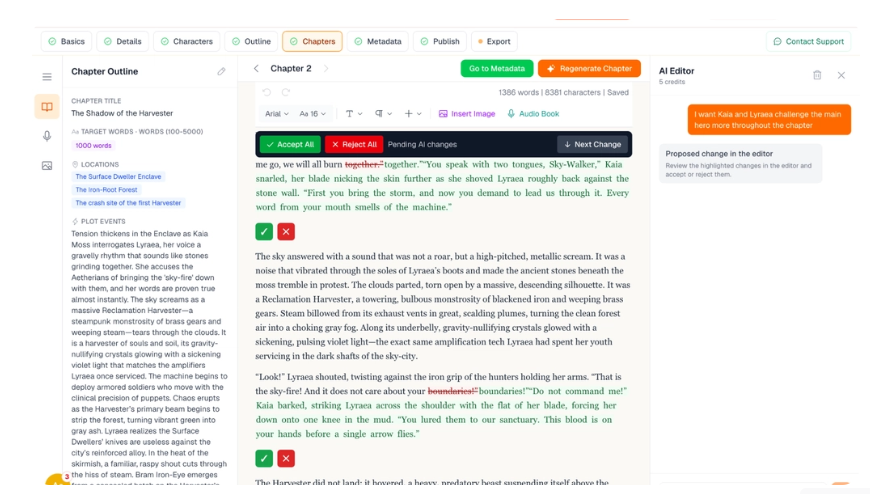
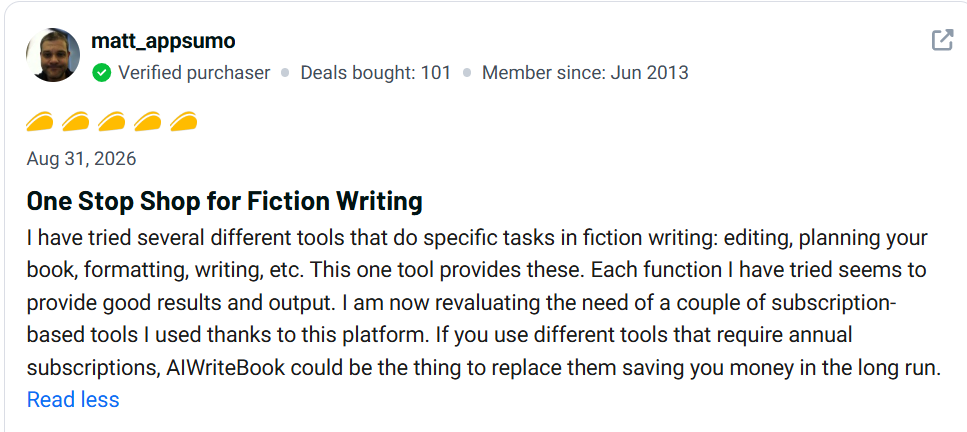
One review from a verified buyer named Matt highlighted a specific feature worth calling out here: a Book Editor mode that runs an editorial pass over an entire existing manuscript, showing every proposed change with a stated reason, so you accept or reject edits line by line instead of the tool silently rewriting your work.
Key Features
Voice Training from Existing Writing
You upload prior work, and AIWriteBook analyzes it to keep new chapters sounding like you rather than like a generic model. This matters because the single biggest complaint about AI writing tools, from casual users and professional editors alike, is that output reads flat and interchangeable. Whether this actually holds up across a full manuscript is something reviewers had mixed things to say about (more on that in the Output Quality section below).
Character Builder
Lets you define a character’s arc, backstory, and personality traits before any chapter gets written. For fiction writers, this is the difference between AI-generated dialogue that’s internally consistent and dialogue that contradicts itself two chapters later, because the system has a reference point to draw from.
Chapter Outline Builder
A structured, editable outline tool for both fiction and nonfiction. You keep full control to edit or regenerate it, which matters because a locked-in AI outline you can’t touch is a common frustration with more rigid “one-click book” tools.
AI Chat Assistant
A chapter-by-chapter assistant for pacing and direction questions. This is positioned as a thinking partner, not a fact-checker, and based on at least one detailed review, treating it as a source of verified facts would be a mistake (see Limitations below).
Illustration Generator and Cover Designer
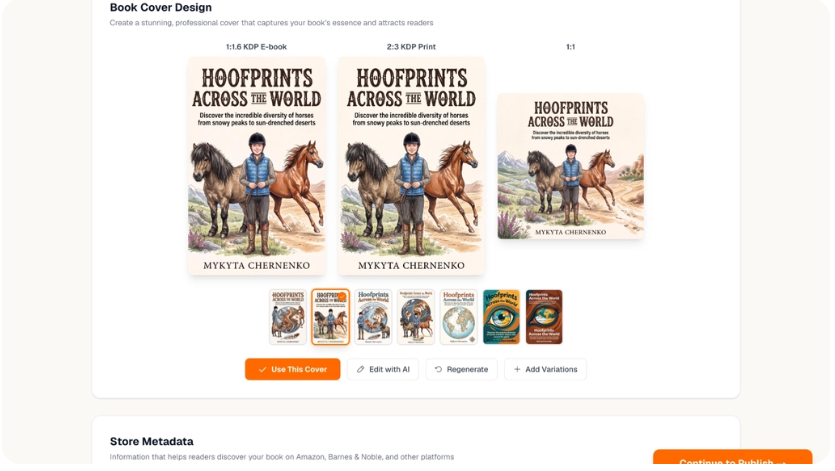
Generates chapter illustrations that stay visually consistent across pages, plus unlimited cover variations. This is a genuinely useful feature for children’s books, cookbooks, and comics specifically, since sourcing consistent character illustrations across a whole book is normally either expensive (a hired illustrator) or inconsistent (generating each image independently with no continuity).
KDP Export and Metadata Tools
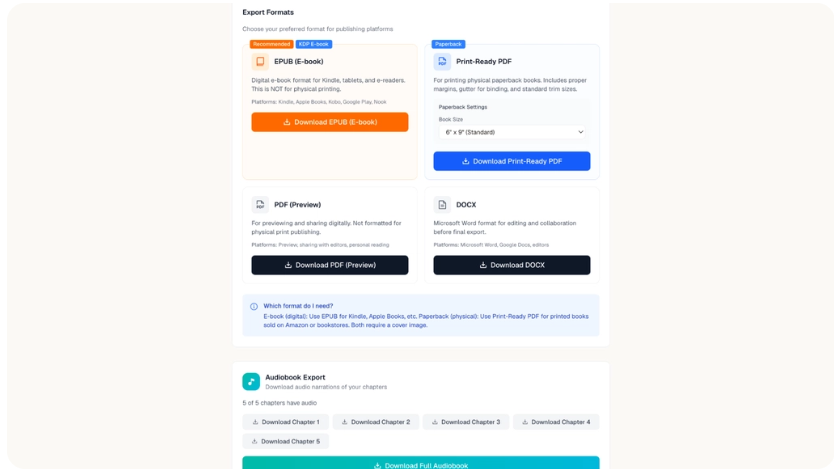
One-click export to EPUB, PDF, and DOCX formatted for Amazon, Apple Books, and Kobo, plus built-in keyword research, blurb writing, and category selection for the actual Amazon listing. This is the step most writing tools skip entirely, leaving you to either learn KDP formatting yourself or pay a formatter.
Book Translation and 30+ Language Support
On License Tier 3 and up, you can write natively in more than 30 languages rather than drafting in English and running it through a separate translation tool afterward, which the listing claims preserves voice better than a post-hoc translation pass.
Audiobook Studio
Available from License Tier 2 upward. Turns your finished manuscript into an audiobook export without a separate narration or production tool. The listing doesn’t specify voice options or narration quality in detail, so if audiobook output quality is a dealbreaker for you, that’s worth confirming directly before buying.
Output / Result Quality
This is the section where I have to be most careful about the line between “verified” and “founder claims,” because I haven’t tested it myself.
On the positive side, multiple verified buyers described genuinely useful output. One reviewer said the tool took a rough nonfiction idea and turned it into a working outline for what’s becoming a full YA fiction series. Another, who purchased Tier 3, used the Book Editor to help refine a family member’s biographical manuscript, saying the tool highlighted areas that needed adjustment, explained why, and offered alternatives rather than silently rewriting text.
On the negative side, a detailed two-out-of-five review raised a specific and credible concern: the reviewer found that AIWriteBook’s tools don’t build on prior context the way a smarter system would; each prompt is treated somewhat from scratch. More seriously, they reported the tool hallucinating competitor books and authors on Amazon that don’t actually exist, when asked to reference real-world market comparisons. That’s a meaningful limitation for nonfiction authors who need factual accuracy, and it’s the kind of issue that’s common across AI writing tools broadly, not unique to AIWriteBook, but it’s still worth knowing before you rely on it for anything requiring verified facts.
AppSumo’s own AI-generated summary of the 118 reviews describes the tool as praised for its book creation process and voice-matched chapters, with drawbacks around initial confusion over credit consumption and limited support for image and voice features. That roughly matches what I found reading through individual reviews myself.
Ease of Use
Multiple reviewers independently described the interface as clean and easy to navigate, including the critical reviewer who otherwise gave the product a low score. The workflow (outline, then characters, then chapters, then export) follows a logical order that should make sense to someone who’s never used an AI writing tool before.
That said, one Tier 3 buyer reported the browser stalling repeatedly while using the chapter editor, particularly on longer chapters with many suggested edits. To their credit, the founder replied publicly with a specific technical explanation (the comparison engine was recomputing the whole chapter on every accept or reject, rather than caching it) and said a fix shipped the same day the issue was reported. That’s a decent sign for how actively the team responds to bugs, even if it means the product is still working out some rough edges as of this writing.
For advanced users who want more control, features like BYOK (bring your own key, via OpenRouter) on Tier 3 and up let you plug in your own AI model access rather than relying solely on AIWriteBook’s built-in credits, which is a nice option for power users but adds a layer of complexity beginners won’t need.
Pros & Cons
Pros
- Covers the full book pipeline (outline, chapters, cover, illustrations, export) in one workspace instead of requiring five separate tools
- Voice training from your own past writing, aimed directly at the “sounds like generic AI” complaint
- KDP-ready export with built-in metadata, keyword, and category tools that most competing writing tools skip
- Founder team appears actively engaged with reviews and bug reports, based on multiple detailed public responses
- Supports both fiction and nonfiction, plus illustrated formats like children’s books and comics on higher tiers
- Lifetime access with a 60-day refund window through AppSumo, which lowers the risk of trying it
Cons
- At least one detailed review reported factual hallucinations (invented competitor titles and authors) when the tool was asked to reference real market data
- Advertised AI-wrapping tools aren’t fully integrated into the writing pipeline according to one reviewer, meaning some outputs have to be manually copied over rather than flowing automatically
- Lower tiers (License Tier 1 and 2) lack book series support, visual books, translation, and BYOK, which matters if you write series or illustrated books
- Monthly credit limits, even on the highest tier (5,000 per month), which could constrain heavy users, and at least one reviewer mentioned initial confusion about how credits get consumed
- Performance issues were reported during heavy editing sessions on longer chapters, though the one documented case was reportedly fixed quickly
- Audiobook and image feature support was flagged as limited in AppSumo’s own AI-generated review summary
Pricing & Plans
This section of the AIWriteBook review covers all four verified pricing tiers. AIWriteBook is sold on AppSumo as a one-time lifetime deal across four license tiers, all discounted from their listed regular price at the time of writing.
Plan | Price | Credits/Month | Best For |
License Tier 1 | $79 (was $144) | 500 | Beginners testing the core writing and outline tools |
License Tier 2 | $159 (was $360) | 1000 | Writers who want audiobooks, an author page, and NSFW support |
License Tier 3 (Recommended) | $319 (was $1,440) | 2500 | Series authors, illustrated/visual books, translation, BYOK |
License Tier 4 | $519 (was $2,000) | 5000 | Power users who also want NanoReads distribution |
All four tiers include lifetime access, the character builder, chapter outline builder, AI writing style builder, first-chapter-by-AI generation, support for 30+ languages, references and citations, easy draft importing, the chapter AI chat assistant, grammar and style checking, the AI illustration generator, the book cover designer, and KDP export with metadata tools.
Here’s where the tiers actually diverge:
- Audiobook studio, author page, and NSFW book support unlock starting at Tier 2.
- Book series support, visual books, book translation, and BYOK (OpenRouter) unlock starting at Tier 3.
- NanoReads distribution (the founders’ own reading platform) is exclusive to Tier 4.
Which plan offers the best value? For most solo authors writing standalone fiction or nonfiction without illustrations, Tier 1 or Tier 2 covers the core workflow. AppSumo itself flags Tier 3 as the recommended plan, and that tracks: it’s the entry point for book series and visual books, which are two of the features that most differentiate AIWriteBook from a plain AI chatbot. Tier 4 mainly adds NanoReads distribution and double the monthly credits, so it’s worth it specifically if you want your book distributed through their platform or if 2,500 credits a month genuinely isn’t enough for your output.
Deal pricing on AppSumo can change or end without notice, so check the current price and terms directly on the product page before buying.
What You Get
Based on the verified listing, every AIWriteBook purchase includes:
- Lifetime access to the core writing workspace (no recurring subscription)
- The character builder, chapter outline builder, and AI writing style builder
- Chapter-by-chapter AI chat assistance
- Grammar and style checking across chapters
- AI illustration generator and book cover designer
- KDP-ready export (EPUB, PDF, DOCX) with metadata and keyword tools
- A monthly credit allowance that varies by tier (500 to 5,000 credits)
- 60-day refund eligibility through AppSumo’s standard policy
- Coverage under AppSumo’s “We Got Your Back” guarantee for Plus members
I didn’t find any mention of bonus training courses, community access, or extra bundled products on the listing, so I’m not including those here. If AIWriteBook adds anything beyond what’s shown on the pricing table, verify it directly on the product page before purchasing.
Best Features
Out of everything on the feature list, five stand out as the most practically useful, based on what buyers actually praised in their reviews and what differentiates AIWriteBook from a generic AI writing tool:
- The full pipeline in one workspace. Reviewer Matt specifically said he was reevaluating several subscription tools he’d been paying for separately, because AIWriteBook covered planning, writing, editing, and formatting in one place.
- The Book Editor’s line-by-line edit review. Showing a stated reason for every suggested change, and letting you accept or reject individually, is a meaningfully more trustworthy approach than a tool that silently rewrites your manuscript.
- Voice training from prior writing. Directly targets the most common complaint about AI-assisted books, which is that they read like nobody wrote them.
- KDP export with metadata and keyword tools. Most competing tools stop at “here’s your draft” and leave formatting and Amazon optimization entirely up to you.
- Illustrated and visual book support. Especially useful for children’s books, cookbooks, and comics, where consistent character illustrations are normally a real cost and logistics problem.
Limitations / What I Don’t Like
The most serious concern raised by an actual buyer is factual reliability. The two-out-of-five review specifically called out invented competitor books and authors that don’t exist on Amazon, Google, or ChatGPT, when the tool was asked to reference real-world market data. If you’re writing nonfiction that requires citing real competitors, comparable titles, or factual claims, that’s a real risk you need to manually fact-check every output, not something to take on faith.
The same reviewer noted that AIWriteBook advertises 20+ “AI-wrapping tools” for brainstorming, but that these aren’t actually connected into the book-writing pipeline, meaning you can generate ideas with them but can’t feed the results directly into your manuscript. If that’s accurate, it suggests a gap between what the marketing implies (a fully integrated toolkit) and what currently works end-to-end.
Credit limits are another practical constraint. Even the top tier caps out at 5,000 credits per month, and at least one reviewer mentioned early confusion about how quickly credits get consumed. If you write fast or generate a lot of illustration variations, it’s worth understanding the credit system before committing to a specific tier.
Finally, features like book series support, translation, and visual books are locked behind Tier 3 and Tier 4. If your first project is a standalone novel with no illustrations, you may be paying for capability you won’t use yet, or feel pressure to buy a higher tier than you currently need in case you expand later.
AIWriteBook vs Competitors
Factor | AIWriteBook | Scrivener | Sudowrite |
Main purpose | Full AI book pipeline: outline, chapters, cover, export | Manuscript organization and drafting (no built-in AI) | AI prose generation for fiction |
AI writing assistance | Built-in, trained on your voice | None | Yes, fiction-focused (Muse model plus others) |
Cover design | Built-in with unlimited variations | Not included | Not included |
KDP export | Built-in, one-click, with metadata tools | Manual compile and formatting | Not included |
Pricing model | One-time lifetime deal ($79 to $519 on AppSumo) | One-time purchase (around $60 per platform) | Subscription, roughly $10 to $59/month |
Nonfiction support | Yes, with references and citations | Yes, general-purpose | Limited, fiction-focused |
Learning curve | Low to moderate | Steep, according to independent reviews | Low to moderate |
Scrivener remains the gold standard for writers who want deep manuscript organization and don’t want any AI involved at all. It’s a one-time purchase, works entirely offline, and has over a decade of a loyal user base behind it, but it has no built-in AI drafting, no cover design, and a genuinely steep learning curve according to independent reviews.
Sudowrite is the closer AI competitor, but it’s fiction-only, doesn’t export to KDP-ready formats, doesn’t design covers, and runs as an ongoing monthly subscription rather than a one-time purchase. For a fiction writer who only cares about sentence-level prose quality and already has a separate formatting and cover workflow, Sudowrite may produce better prose in isolation. For someone who wants the entire pipeline handled without stitching tools together, AIWriteBook’s scope is the more direct fit, assuming the fact-accuracy concerns raised by reviewers don’t apply to your project.
Neither comparison is a clean win in every category. If flawless prose quality is your top priority, Sudowrite has a longer track record specifically for fiction craft. If manuscript organization without any AI is what you want, Scrivener is still hard to beat. If you want one workspace that goes from blank page to KDP-ready file, AIWriteBook is doing something neither of those tools attempts on its own.
Best Alternatives
Scrivener: Best for writers who want powerful manuscript organization without any AI involved. Main advantage: one-time purchase, works fully offline, huge community of tutorials and templates. Main disadvantage: no AI drafting, no cover design, and a learning curve steep enough that some reviewers report abandoning projects mid-way. Choose this if you want full manual control and don’t want AI touching your prose at all.
Sudowrite: Best for fiction writers focused specifically on prose quality. Main advantage: a dedicated fiction model (Muse) plus access to other leading AI models, with tools built around narrative craft like sensory description and style rewriting. Main disadvantage: no export to EPUB, PDF, or DOCX, no cover design, and it’s a recurring subscription rather than a one-time payment. Choose this if sentence-level prose is your bottleneck and you already have a formatting and cover workflow sorted out.
A freelance editor plus a cover designer plus a formatter: Best for authors who want each stage handled by a specialized human professional. Main advantage: highest ceiling on quality and originality, with no AI-hallucination risk. Main disadvantage: significantly higher cost per book and a much longer turnaround time, since you’re coordinating multiple people instead of one workspace. Choose this if budget and timeline aren’t your main constraints and quality control matters more than speed.
A general-purpose AI chatbot (used manually for drafting): Best for writers on a tight budget who don’t mind manually managing outlining, formatting, and cover sourcing themselves. Main advantage: often cheaper or free, and flexible for other writing tasks beyond books. Main disadvantage: no book-specific structure, no built-in cover or KDP export tools, and no persistent voice training across a whole manuscript. Choose this if you’re just testing whether AI-assisted writing works for you before committing to a dedicated tool.
Who Is It Best For?
- Independent authors who want to self-publish on Amazon KDP without hiring a separate formatter
- Freelance writers and ghostwriters managing multiple client manuscripts who need consistent voice training per project
- Solopreneurs and coaches writing a nonfiction book as a lead magnet or authority-building tool, thanks to the references and citations feature
- Children’s book and cookbook authors who need consistent illustrations across many pages, where the illustration generator and cover designer add real value
- Series writers, specifically at Tier 3 and above, where book series support and character continuity tools matter most
Who Should Avoid It?
- Writers who need guaranteed factual accuracy without manual fact-checking, given the documented hallucination issue with competitor and market data
- Anyone expecting a fully integrated, single-prompt “book in one click” experience, since at least one reviewer found the 20+ advertised AI tools aren’t yet wired into the core pipeline
- Heavy-volume writers on a budget, since even the top tier caps monthly credits at 5,000, and credit consumption reportedly confused at least one early buyer
- Writers who specifically want zero AI involvement in their prose, for whom Scrivener or a traditional word processor remains the better fit
Use Cases
A first-time nonfiction author building a lead magnet. A coach or consultant with a book idea but no writing background can use the chapter outline builder and reference/citation tools to structure a credible nonfiction book, then use the KDP export tools to publish it without hiring a formatter. Limitation: any specific factual claims or competitor references should be manually verified before publishing, given the accuracy concerns raised by reviewers.
An indie novelist starting a book series. Tier 3 unlocks book series support and the character builder, letting an author maintain consistent character arcs and voice across multiple books. Limitation: this tier costs meaningfully more than Tier 1 or 2, so it only makes sense if you’re committed to writing more than one book.
A parent or grandparent turning a manuscript into a family memoir. As one verified reviewer described, the Book Editor mode can run an editorial pass over an existing draft, showing suggested changes with reasons attached, which lets a non-professional writer retain control over the final edit rather than accepting a fully AI-rewritten version. Limitation: at least one user reported the browser stalling during heavy editing sessions on long chapters, though the reported case was reportedly fixed quickly by the team.
A children’s book author who can’t afford a professional illustrator. The illustration generator produces chapter illustrations that stay visually consistent across pages, addressing one of the most expensive parts of self-publishing an illustrated book. Limitation: the AppSumo review summary specifically flags “limited support for image and voice features” as a common complaint, so expectations should be set accordingly.
Value for Money
Whether AIWriteBook is worth the price comes down to how many separate tools it actually replaces for you. A single Tier 1 purchase at $79 is cheap enough that it’s a low-risk way to test whether an all-in-one AI book workspace fits your process, especially with AppSumo’s 60-day refund window covering the purchase.
Compared to paying for a fiction-focused AI tool like Sudowrite ($10 to $59 per month, which adds up to $120 to $708 over a year) plus a separate cover designer and formatter, AIWriteBook’s one-time pricing looks like meaningfully better long-term value on paper, assuming the output quality holds up for your specific project. Compared to Scrivener’s roughly $60 one-time price, AIWriteBook costs more but adds AI drafting, cover design, and illustration generation that Scrivener simply doesn’t offer.
The honest caveat is the hallucination issue raised in the critical review. If your book depends on factual accuracy (nonfiction with real citations, competitor comparisons, historical claims), you need to budget time for manual fact-checking regardless of which tier you buy, and that time cost doesn’t show up on the pricing page.
Customer Reviews / User Feedback
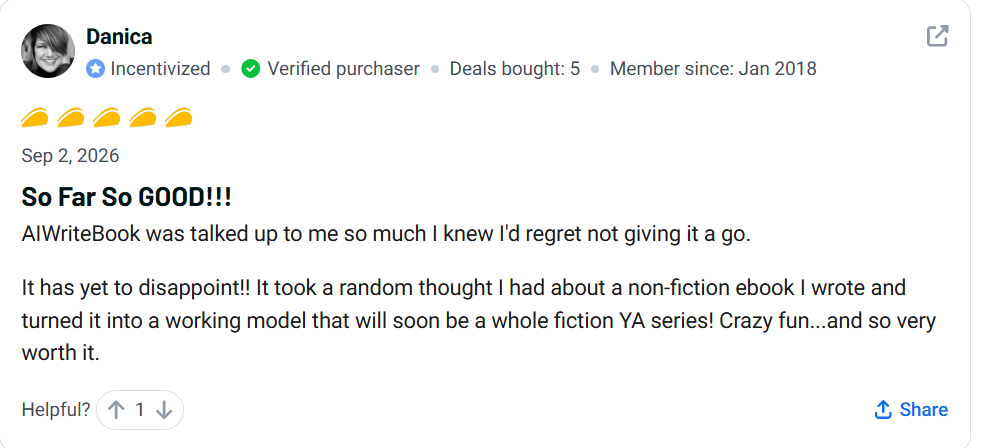
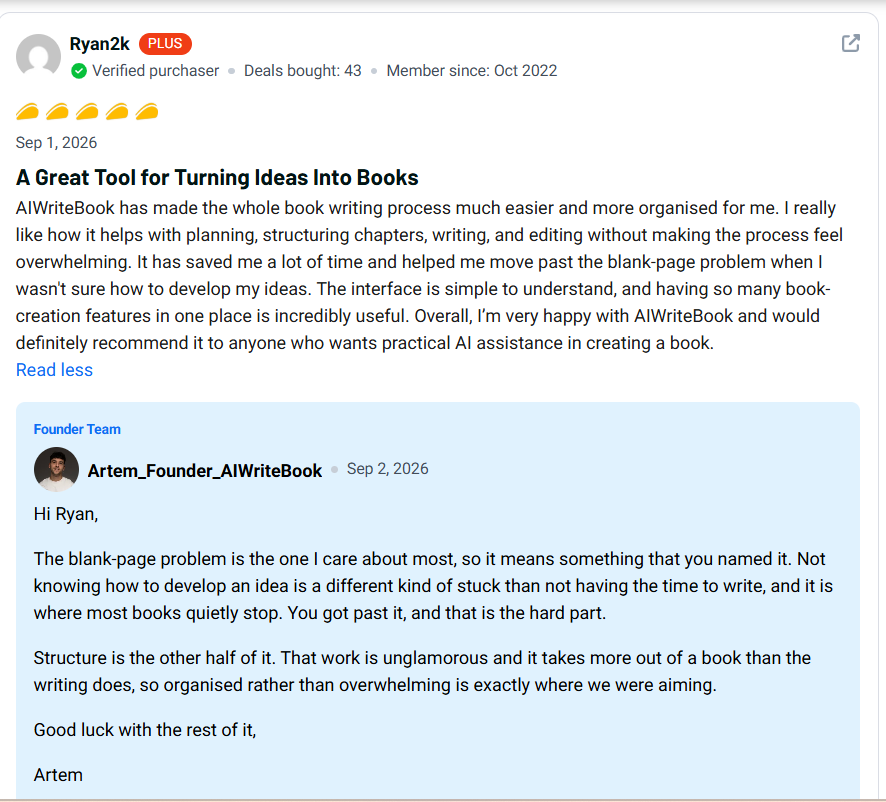
AIWriteBook holds a 4.7 out of 5 rating on AppSumo across 118 reviews, with a taco-rating breakdown of 98 five-taco reviews, 14 four-taco, 4 three-taco, 2 two-taco, and 0 one-taco reviews at the time of writing. The founders separately cite a 4.6 rating on Trustpilot.
Common positive feedback centers on the tool making book planning and structuring feel less overwhelming, helping writers get past the blank-page problem, and consolidating multiple separate writing subscriptions into one platform. Reviewers specifically praised the Book Editor’s transparent, reason-attached edit suggestions.
Common complaints include the previously mentioned hallucination issue with market and competitor data, confusion around how credits get consumed early on, and at least one report of browser performance issues during heavy editing sessions (which the founder says was fixed the same day it was reported). AppSumo’s own AI-generated summary of the full review set independently flags “limited support for image and voice features” as a recurring minor drawback.
One thing worth noting: the founders respond personally and in detail to reviews, including critical ones, with specific technical explanations rather than generic customer service replies. That’s not a guarantee of product quality, but it is a reasonable signal about how seriously the team takes reported issues.
FAQ
What is AIWriteBook?
It’s an AI-powered book writing platform that handles outlining, chapter drafting in your own voice, character building, cover design, illustrations, and KDP-ready file exports in a single workspace.
Is AIWriteBook worth it?
For independent authors who want an all-in-one book workspace instead of separate tools for writing, cover design, and formatting, it’s a reasonable one-time investment, especially covered by AppSumo’s 60-day refund window. Its value depends heavily on how much you rely on features flagged as inconsistent in reviews, particularly fact accuracy for nonfiction.
Who is AIWriteBook best for?
Independent authors, freelance writers, solopreneurs, coaches writing nonfiction books, and illustrated-book authors (children’s books, cookbooks, comics) at the higher tiers.
Is it beginner-friendly?
Multiple reviewers, including a critical one, described the interface as clean and easy to navigate. The overall workflow follows a logical sequence that shouldn’t require a steep learning curve for a first-time user.
What are the main features?
Voice training from prior writing, a character builder, a chapter outline builder, an AI chat assistant, grammar and style checking, an illustration generator, a cover designer, and KDP-ready export with metadata and keyword tools.
What are the disadvantages?
Reported factual hallucinations on competitor and market data, some advertised AI tools not yet fully integrated into the writing pipeline, credit limits even on the top tier, and reported performance issues during heavy editing (reportedly fixed quickly).
How much does the AIWriteBook Appsumo deal cost?
As a lifetime deal, pricing runs from $79 for License Tier 1 up to $519 for License Tier 4, based on credit allowance and feature access. Confirm current pricing on the AppSumo listing before buying, since deal terms can change.
Does it offer good value?
Compared to a recurring AI writing subscription plus separate cover design and formatting tools, the one-time pricing of the AIWriteBook lifetime deal looks favorable on paper. The real answer depends on whether the output quality matches your specific project’s needs.
What are the best alternatives?
Scrivener for AI-free manuscript organization, Sudowrite for fiction-focused AI prose generation, or a traditional freelance editor, cover designer, and formatter for the highest quality ceiling at a higher cost.
How does it compare with Scrivener?
Scrivener is a one-time-purchase organizational tool with no built-in AI. AIWriteBook adds AI drafting, cover design, and KDP export that Scrivener doesn’t offer, at a somewhat higher price point.
Should I buy AIWriteBook?
If you want a single workspace covering the full book pipeline and you’re comfortable manually fact-checking AI-generated content, it’s worth testing within the refund window. If guaranteed factual accuracy without review is essential to your project, treat any AI writing tool, including this one, with appropriate caution.
Is there a free trial?
The AppSumo listing doesn’t mention a free trial; it’s sold as a paid lifetime deal with a 60-day refund window instead. Confirm current terms on the listing before purchasing.
Final Verdict
AIWriteBook is a genuinely ambitious attempt to compress the entire self-publishing pipeline (outline, draft, edit, illustrate, design, export) into one AI-powered workspace, and based on 118 buyer reviews, it’s landing well with most of the people who’ve actually used it. A 4.7 average rating with 98 out of 118 reviews at the top tier isn’t nothing.
Who should buy it: independent authors and freelance writers who are tired of juggling separate tools for writing, cover design, and formatting, and who are comfortable treating AI output as a strong first draft rather than a finished, fact-checked product.
Who should skip it: anyone writing nonfiction where factual precision matters and who isn’t prepared to manually verify every claim, given the specific hallucination issue one detailed reviewer documented.
Its biggest strength is scope: almost nothing else on the market handles outline-to-KDP-export in one place, at a one-time price, the way this does. Its biggest weakness is that the “AI tools” and integrations underneath that scope aren’t uniformly reliable yet, based on real buyer feedback rather than marketing copy.
Is it worth the price? For most solo authors testing whether an all-in-one AI book tool fits their process, yes, particularly given the refund window that limits your downside. Is it better than the alternatives for everyone? No. If your priority is either zero-AI manuscript organization or best-in-class fiction prose specifically, Scrivener or Sudowrite respectively will serve you better in that one narrow lane.
Rating / Score
Category | Rating |
Ease of Use | 4/5 |
Features | 4.5/5 |
Output Quality | 3.5/5 |
Value for Money | 4/5 |
Support/Responsiveness | 4.5/5 |
Overall | 4/5 |
These scores reflect an analysis of the verified AppSumo listing, feature comparison table, and 118 buyer reviews rather than hands-on testing. The Output Quality score in particular reflects a genuine split between strongly positive reviews and one detailed, credible critical review.
Check the Current AIWriteBook AppSumo Deal
Interested in trying AIWriteBook? Check the current pricing, tier breakdown, and available offer on AppSumo before making your decision, since deal terms and pricing can change.