If you make video content, you know the annoying part. It’s not the idea. It’s the recording.
Every new script means a new take. New lighting. New energy. If you post on more than one platform, you do it all over again. If you need another language, you do it again.
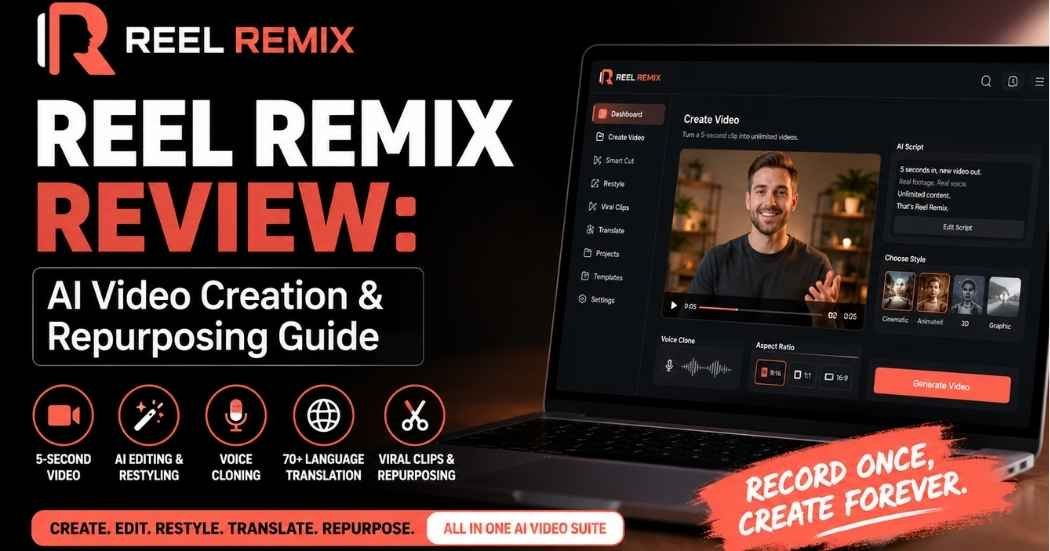
This Reel Remix review looks at a tool built to fix that exact problem. The pitch is simple. Record yourself for about five seconds. Let AI turn that into new video content on demand. No re-shoots for every hook. No re-recording every version for TikTok, Reels, and YouTube Shorts.
This Reel Remix review walks through what the tool actually does. I’ll cover the workflow, the pricing tiers, and who it’s really built for. This is an affiliate review, so some links may earn a commission if you buy. That doesn’t change what I think of the product.
What Is Reel Remix?
This section of the Reel Remix review covers the basics. Reel Remix is an AI video creation and content repurposing tool. The core idea is simple: use a short piece of real footage, not a synthetic avatar, as the base for new videos.
Most AI video tools fall into two camps. Some generate a fully synthetic avatar that never actually recorded anything. Others are heavy manual editors that still require you to shoot every scene yourself. Reel Remix sits between those two. It uses your real face, expressions, and voice from a short clip. Then it builds new scripted videos, restyled versions, translated versions, or short clips around that source.
Depending on your plan, the tool can:
- Generate new scripted videos from a short source clip
- Restyle existing footage into a different visual look
- Clean up raw recordings automatically
- Add captions without manual timing
- Clone your voice for new scripts
- Translate videos into more than 70 languages
- Reframe video for different aspect ratios
- Upscale footage to 2K or 4K
- Cut long recordings into short, platform-ready clips
The point isn’t one video. It’s a system for turning a small amount of real footage into a much bigger stack of content. For a review site, a course, an agency, or a brand account that posts often, that’s a different way to work than starting from zero each time.
How Does Reel Remix Work?
The next part of this Reel Remix review looks at the workflow itself. It’s built for someone who has never touched a video editor.
Step 1: Upload a video or photo. Start with a short clip or a still photo. This is the base everything else gets built from.
Step 2: Add your prompt. Tell Reel Remix what kind of video you want. The prompt guides the script the AI writes.
Step 3: Choose a style. Pick from more than 30 visual styles. Options include bold graphic looks, illustrated animation, tech and UI themes, retro, and cinematic.
Step 4: Pick your voice and aspect ratio. Choose the voice for the video. Set the format: 9:16 for Reels and TikTok, 1:1 for feed posts, or 16:9 for YouTube.
Step 5: Review the script. Before anything renders, you read and edit the script. This step matters. AI-written scripts still need a human check before they go live.
Step 6: Choose a template. Pick a template that fits the content type.
Step 7: Render and download. Reel Remix generates the finished video. Once it’s done, download it or remix the same source into another style or template.
The short version: source footage, prompt, script review, style, template, render, remix. It’s not a one-click button, and it shouldn’t be treated like one. But it’s far fewer steps than a normal shoot-and-edit process.

Key Reel Remix Features Worth Knowing About
Here’s where the Reel Remix features list gets long. Let’s break down what actually matters in each one.
Extend
Extend sits directly on top of the five-second concept. You use a short source clip as the base. The platform creates new scripted videos from it. You’re not re-recording yourself for every script. This is the feature that saves the most time if you post on a schedule.
Restyle and Clean Cut
Restyle changes the entire visual look of your footage. It can go cinematic, animated, 3D, or one of the other available looks. Clean Cut does a different job. It improves footage you already have instead of changing its style. One transforms the video. The other polishes it.
Smart Cut
Say you record several raw takes of the same video. You don’t want to stitch the best one together by hand. Smart Cut does that work. It trims dead air, tightens pacing, adds captions, and can add punch-ins or zoom effects. The result looks social-ready without you scrubbing through footage frame by frame.
Viral Captions
Captions get generated and timed for you. You don’t drag text boxes around in an editor. Most people watch short-form video with the sound off, so this is one of the more useful Reel Remix features on the list.
Voice Cloning
Voice Cloning lets the platform generate new video content using the source person’s voice. It pairs directly with Extend. One thing matters here: only clone or use a voice you actually have rights or permission to use. This isn’t optional advice. It’s the responsible way to use a tool like this.
30+ Styles
More than 30 visual styles are available. That includes bold graphic, illustrated, tech and UI, handmade, retro, cinematic, animated, and 3D. You can test different looks for the same script without rebuilding the video each time.
AI-Generated Scripts
The platform writes a script based on your prompt. You review it before rendering. That review step keeps a human in the loop instead of letting AI output go straight to publish. That’s exactly how this kind of tool should be used.
Captions, Hooks, Outros, and Music
Beyond the core render, Reel Remix can add zoom and punch effects, a hook at the start, an outro card, and background music. The goal is fewer separate apps between raw footage and a finished, publish-ready clip.
The 5-Second Video Concept, Explained
This is the part of the Reel Remix review worth slowing down for. It’s the thing that actually separates this tool from a generic AI video generator.
The old way of making video looks like this: new idea, new script, new recording, new edit. Every time. Reel Remix flips that into: short source recording, new script, AI-generated video, remix.
Picture an affiliate marketer promoting five products in a week. Under the old model, that’s five separate recording sessions. With Reel Remix, one short source clip can become the base for all five, each with a different script and hook. A coach turning one lesson into several short educational clips works the same way.
I want to be careful here. It’s easy for a review like this to oversell the “unlimited content” idea. The quality of the output still depends on the quality of the source footage. Every generated video should get a review before it goes live, not an upload while blind. But the shift itself, recording less and repurposing more, is a real and useful change if you make video regularly.
AI Video Editing and Restyling
Reel Remix isn’t only a generator. It’s also an editor for footage you already have.
A raw recording can go through Smart Cut, get captions added, gain a hook at the front, run through a template, and come out the other side as a finished reel. Or existing footage can go through Restyle and come out looking different visually while keeping the same content.
This matters most for people who already have a backlog of raw footage sitting on a hard drive. That footage often stays unused because editing it properly takes too long. These tools give it a faster path to actually going live. The output is still a starting point for review, not a finished product to trust blindly.
Voice Cloning and 70+ Language Translation
The Go Global side of Reel Remix is built for reaching audiences outside your primary market. It includes translation into more than 70 languages, voice-matched dubbing, lip sync, smart reframing, multiple aspect ratios, and up to 4K upscaling.
Say you already have a strong English-language video. You want a Spanish, French, or German version without recording it three separate times. This is where the tool earns its keep. One English video can become a Spanish version, then a French version, then whatever else the audience needs.
One caveat matters here: AI translation and lip sync are not perfect. Check script accuracy and audio quality in each language before anything goes live. This matters most for anything customer-facing.
Viral Clips and Content Repurposing
A lot of long-form content just sits there after it’s published once. A 60-minute webinar or a podcast episode usually has several strong short clips buried inside it. Finding and cutting them by hand takes real time.
The Viral Clips feature is built for that exact job. It works from podcasts, webinars, long-form videos, or a URL. It handles best-moment detection, auto-tightening, captions, and platform formatting. One webinar can turn into a handful of short clips. One podcast episode can become several separate social posts.
Out of everything in the platform, this is probably the most immediately practical feature. It’s built for anyone who already produces long-form content and hasn’t had time to repurpose it.
Who Reel Remix Actually Makes Sense For
Not every use case fits this tool equally well. This part of the Reel Remix review breaks down who tends to get the most value from it.
Affiliate marketers need fresh promotional angles for different offers on a regular basis. Generating different hooks and variations from one source clip cuts down on how often you need to record something new.
Coaches and course creators can turn one lesson into several shorter educational clips. That helps keep a social feed active without a full new recording session for each post.
Agencies and freelancers can build a repurposing service around this. There’s a reseller option on one of the upgrade tiers, which turns one short client clip into a stack of deliverables.
E-commerce and DTC brands can test different creative angles and hooks from the same product footage. That’s useful specifically for ad testing.
Podcasters and webinar hosts get the clearest use case. Long recordings that already exist can become short-form content without extra recording.
Faceless creators aren’t left out either. Captions, restyling, translation, and repurposing all work without anyone appearing on camera in every clip.
Social media managers running several accounts can adapt one piece of source content into multiple formats and styles quickly.
Who Should Probably Skip It
This isn’t a fit for everyone, and it shouldn’t be sold as one.
Skip it if you rarely make video content. The feature set here is more than you need. Skip it if you already have an editing workflow you like and prefer doing everything by hand. Professional filmmakers who need specialized production tools will find this too general-purpose. And if you won’t review AI-generated scripts, voices, and translations before publishing them, this tool will cause more problems than it solves.
Reel Remix Pros and Cons
This Reel Remix review wouldn’t be complete without a balanced look at both sides.
Pros:
- Built around real source footage instead of a fully synthetic avatar
- Smart Cut and Clean Cut handle a lot of manual editing work automatically
- 30+ visual styles for the same source content
- Voice cloning tied directly to the source recording
- Translation into 70+ languages with dubbing and lip sync on the relevant tier
- Multiple aspect ratios covered out of the box
- Viral Clips turns long-form content into short clips automatically
- Commercial license included on the stated front-end offer
- Reseller tier available for agencies
Cons:
- AI-generated output still needs a manual review pass
- Result quality depends heavily on your source footage
- Voice cloning and lip sync won’t be perfect every time
- Rendering takes real processing time, especially for longer clips
- Some features are locked to higher tiers or require extra credits
- Not much value here if you already prefer fully manual editing
- Offer details and pricing can change without notice
Reel Remix Pricing and OTOs
Here’s the current Reel Remix pricing structure, based on the offer information provided. Understanding Reel Remix pricing upfront helps you avoid buying tiers you don’t actually need. Always check the live sales page before buying. Pricing and inclusions can shift.
Front End: Reel Remix Commercial — $47 one time Includes the full Reel Remix Studio, a commercial license, 750 starter credits, Extend, Restyle and Clean Cut, Smart Cut, Viral Captions, Voice Cloning, every aspect ratio, face or faceless options, and the DFY Viral Vault.
OTO 1: Pro Unlimited — $67 one time Adds premium styles, priority rendering, renders up to 15 minutes long, 4K upscaling, unlimited projects, unlimited exports, unlimited workspaces, and 3,000 additional credits.
OTO 2: Go Global — $67 one time Adds translation into 70+ languages, voice-matched dubbing, lip sync, smart reframing across 9:16, 1:1, and 16:9, and 4K/2K upscaling.
OTO 3: Viral Clips — $47 one time Adds podcast-to-clips, webinar-to-clips, and URL-to-clips conversion, plus best-moment detection, auto-tightening, captions, and platform formatting.
OTO 4: Reseller — $197 one time Adds client seats, client credit allocation, 25 reseller license keys, customer management, usage tracking, account enable/disable controls, and per-customer credit top-ups.
Which Reel Remix Plan Actually Fits You
You don’t need every tier here. Most people shouldn’t buy them all.
Start with the front end if you want the core video creation workflow. Add Pro Unlimited if you hit render-length limits or want 4K output and unlimited projects. Go Global only makes sense if you actually produce content for non-English audiences. Viral Clips is worth it if you already have podcasts or webinars sitting unused. Reseller only makes sense if you plan to build a client-facing service around this, not just use it for your own content.
Buy based on what your workflow actually needs. Don’t buy an upgrade just because it’s sitting in front of you at checkout.
Reel Remix Alternatives
No Reel Remix review is complete without a quick look at the competition. Plenty of other AI video tools exist, and they don’t all solve the same problem. Some lean heavily into fully synthetic AI avatars. Others work mainly as editors, or focus on short-form clipping from long-form content.
When you compare Reel Remix against alternatives, check these categories: AI video generation, avatar-based creation, editing depth, voice cloning, translation coverage, repurposing tools, aspect-ratio support, commercial licensing terms, and pricing. The clearest thing that sets Reel Remix apart is the five-second source footage concept paired with the remix workflow. If a competitor’s core strength is fully synthetic avatars instead of real source footage, it’s solving a slightly different problem than this tool is.
Frequently Asked Questions
This FAQ section closes out the Reel Remix review with quick answers to the questions people ask most.
What is Reel Remix?
It’s an AI video creation and repurposing platform. It builds new video content from a short source clip or photo, instead of requiring a new recording for every video.
How does Reel Remix work?
Upload a clip or photo, add a prompt, pick a style, review the generated script, choose a template, and render. You can remix the finished video into another style or template.
Can Reel Remix really create videos from a 5-second clip?
Yes. That’s the core concept behind the platform. A short source recording becomes the base for new scripted videos.
Does Reel Remix support voice cloning?
Yes, it’s part of the stated feature set. Use it only with a voice you have permission to clone.
How many languages does Reel Remix support?
The Go Global offer states support for more than 70 languages, including voice-matched dubbing and lip sync.
Can Reel Remix turn podcasts into short clips?
Yes, through the Viral Clips feature. It also works with webinars and long-form URLs.
What aspect ratios does Reel Remix support?
9:16, 1:1, and 16:9 are all supported across the stated offers.
Is there a commercial license?
Yes. The $47 front-end offer includes a commercial license.
How much does Reel Remix cost?
Based on current Reel Remix pricing, the front end is $47 one time. Optional upgrades run $67, $67, $47, and $197. Prices can change, so check the current offer.
What are the Reel Remix OTOs?
Pro Unlimited, Go Global, Viral Clips, and Reseller are the four listed upgrade tiers.
Is Reel Remix good for affiliate marketers?
It can be, especially for anyone who needs frequent promotional video variations without recording every version separately.
Is Reel Remix worth buying?
That depends on how much video you actually make. If video is a regular part of your workflow, the mix of AI generation, editing, translation, and repurposing tools here can cut down real repetitive work. If you rarely touch video, it’s probably more tool than you need.
Final Verdict: Is Reel Remix Worth It?
So, is Reel Remix worth it? That depends less on the AI itself and more on how much video you’re actually producing.
What stands out in this Reel Remix review isn’t that the platform uses AI. Plenty of tools do that now. It’s the workflow built around a short piece of real footage getting turned into a much larger stack of usable content: new scripts, new styles, new languages, new short clips pulled from long recordings.
None of that replaces a human checking the output. Source footage quality, generated scripts, voice results, and translations all need a review pass before anything goes live. That’s not a knock on the tool. It’s just how AI-generated content should get treated in general.
If you’re an affiliate marketer, coach, agency, or social media manager who’s constantly short on time to record new video, this is worth a closer look. If you only make an occasional video, you’re probably paying for more than you’ll use.
If the workflow matches how you actually create content, check the current offer and pick the plan that fits your needs. Skip the upgrades you don’t need.