Documentation is a job everyone agrees matters. Almost nobody wants to do it. Code changes. Features ship. The docs page from six months ago is quietly wrong. That gap is what GitDoc tries to close. It’s why I sat down to write this GitDoc review.
If you’ve been searching for a GitDoc Review 2026 that looks past the sales page, this one is for you. I’ll walk through what GitDoc does, who it fits, what it costs, and where it falls short. No tool is a perfect fit for everyone.
Product Overview
This GitDoc review starts with the basics. GitDoc is an AI-powered documentation platform. It helps teams create, manage, update, and publish documentation from sources they already have.
Instead of writing every page from a blank screen, you connect existing material. That could be a GitHub repo, a PDF, a URL, or an OpenAPI spec. The platform helps turn that into structured docs.
The developer angle sets this apart from a plain writing tool. GitDoc leans hard into GitHub workflows, API access, and AI-agent compatibility. That puts it closer to a documentation platform for software teams than a general note-taking app. So the real question for this GitDoc review is simple. Is it genuinely useful for people who maintain technical docs? Or is it just feature-heavy without much substance behind it?
What Is GitDoc?
GitDoc is a documentation tool built around modern development workflows. It can pull from GitHub repositories, URLs, PDFs, and OpenAPI specifications. From there, it helps build out a documentation site instead of making you type everything from scratch.
This part of the GitDoc review is about what the platform actually is, not what the marketing page says. The core idea is simple. You probably already have the information somewhere — in your codebase, your API spec, or an old PDF nobody’s opened in a year. GitDoc’s job is to take that raw material and turn it into something you can publish.
How well it does that depends on two things. One is how messy your source material is. The other is how much editing you’re willing to do afterward. I’ll come back to that later.

How Does GitDoc Work?
The workflow is fairly linear. That’s a good thing. Overly complicated setup is where a lot of AI tools lose people in the first ten minutes.
Here’s the general flow:
- Connect or upload your source content (GitHub repo, URL, PDF, or API spec).
- Let GitDoc process and analyze that information.
- Generate a first draft of the documentation with AI.
- Edit, reorganize, and clean up the generated content.
- Publish the finished documentation.
- Keep it synced automatically when supported sources change.
Step four deserves your attention. AI-generated documentation is a starting point. It’s not a finished product. If you’re hoping to connect a repo and walk away with publish-ready docs, lower that expectation. The realistic payoff is faster first drafts, not zero-effort documentation.
Who Is GitDoc For?
GitDoc is built for people who create and maintain technical or product documentation on an ongoing basis. That includes SaaS founders, developers, product teams, and technical writers. It also covers agencies, API developers, and anyone running a knowledge base that needs to stay current.
If your documentation needs are occasional — a help page here, an FAQ there — GitDoc is probably more tool than you need. This platform earns its keep when documentation is a recurring, evolving part of your work. Not a once-a-year task.
Key Features
A lot of SaaS reviews turn into a bullet-point dump of the sales page at this point. This GitDoc review is going to try not to do that. Each feature below gets a plain explanation, a real use case, and a short honest take.
AI Documentation Generator
The AI documentation generator is the headline feature. It’s the reason most people search for GitDoc AI in the first place. You feed it existing material instead of starting from a blank editor. It drafts documentation based on that source.
Key benefits:
- Faster first drafts than writing from scratch.
- Less repetitive manual writing.
- A structured starting point for technical content.
- Turns scattered information into something organized.
This is genuinely useful for teams that have code or specs but no documentation yet. That said, the AI output still needs a human pass. Technical accuracy matters more here than in most content types. A wrong parameter or an outdated endpoint on a docs page can waste a developer’s whole afternoon. Treat the AI draft as a first pass, not the final word.
GitHub Integration & Auto-Sync
For teams already living in GitHub, this might be the most useful feature on the list. Documentation tied to a fast-moving codebase goes stale fast. Manual updates are the first thing to slip when a team gets busy.
Key benefits:
- Cuts down on repetitive manual updates.
- Fits naturally into an existing developer workflow.
- Keeps documentation tied to the source material.
- Especially useful for projects with frequent releases.
If your product ships often, this kind of sync matters more than almost any other feature here. It’s also the feature most likely to sit unused if nobody on the team owns the documentation process. The tool can only sync what someone remembers to connect.
Generate Docs from PDFs, URLs & OpenAPI
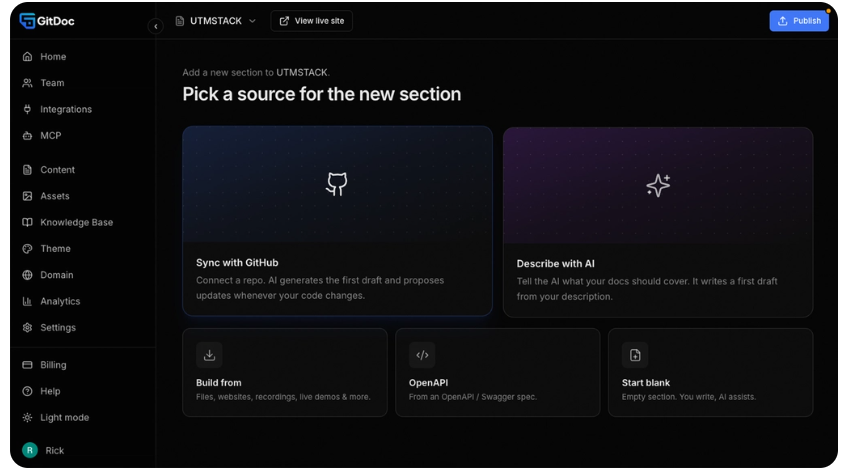
Not every team’s source material lives in GitHub. GitDoc also supports PDFs, URLs, and OpenAPI specifications as inputs. That opens the door for API-first teams and companies with documentation scattered across formats.
An API developer can use an OpenAPI spec as the backbone for their docs. A company with old PDFs or web pages can use those as raw material instead of retyping everything by hand. It’s a practical feature. It widens who this tool actually works for beyond pure GitHub shops.
AI & MDX Editor
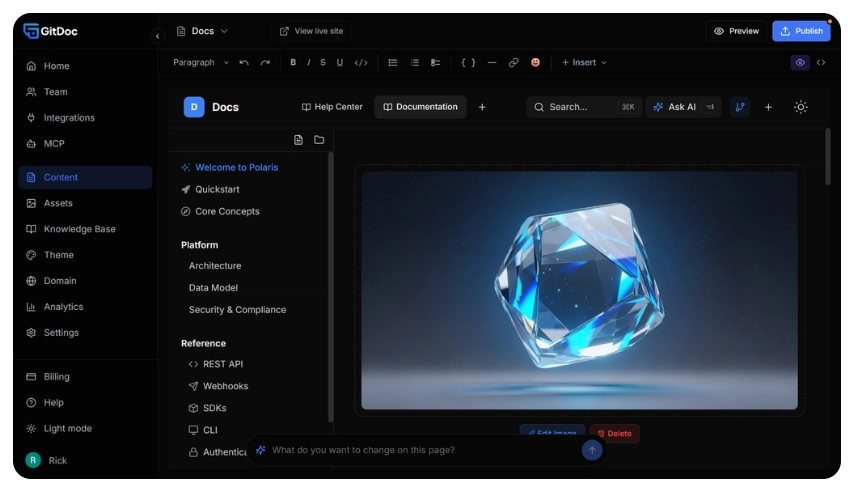
Once content is generated, you need somewhere to refine it. GitDoc’s editor supports both AI-assisted editing and MDX. That gives you a choice between a faster assisted workflow and more granular developer control.
This dual approach makes sense. Non-technical team members can lean on AI suggestions to tighten up the copy. Developers who want precise control over formatting and embedded components can work directly in MDX. Having both options in one editor avoids forcing a single workflow on a mixed team.
AI Agent Support
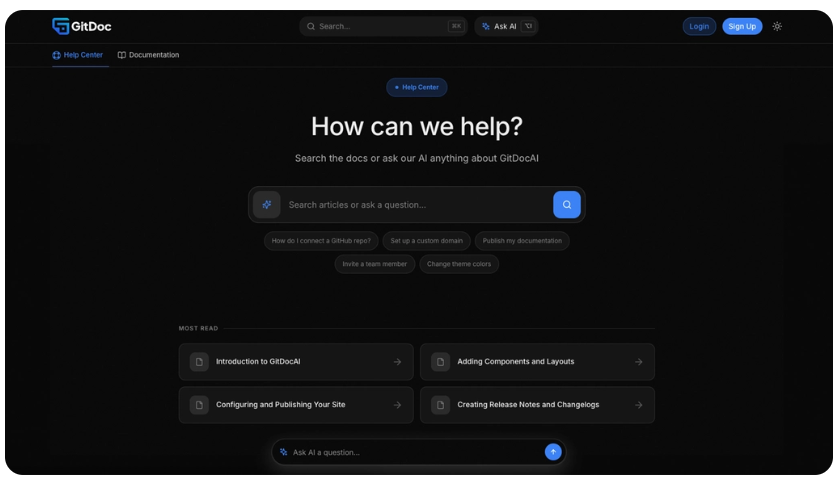
Documentation used to have one audience: humans reading a page. That’s changing. AI assistants and coding agents increasingly need to pull information from documentation directly. GitDoc builds toward that use case with dedicated AI agent support.
For software companies building AI-assisted products, this is a forward-looking feature. It won’t pay off on day one for most people. It’s worth having if your roadmap includes AI-facing tools. It’s less critical if it doesn’t.
MCP & API Access
MCP and API access extend documentation beyond a browser tab. The idea is to let other applications and AI systems query your documentation directly. That beats relying on someone manually searching through pages.
This is one of the more technical, forward-leaning parts of the platform. It’s most relevant to developers building AI-powered workflows on top of their own documentation. If that’s not your world, you’ll likely never touch it. That’s fine, but worth knowing before you pay for a tier built around it.
Custom Domain & Branding
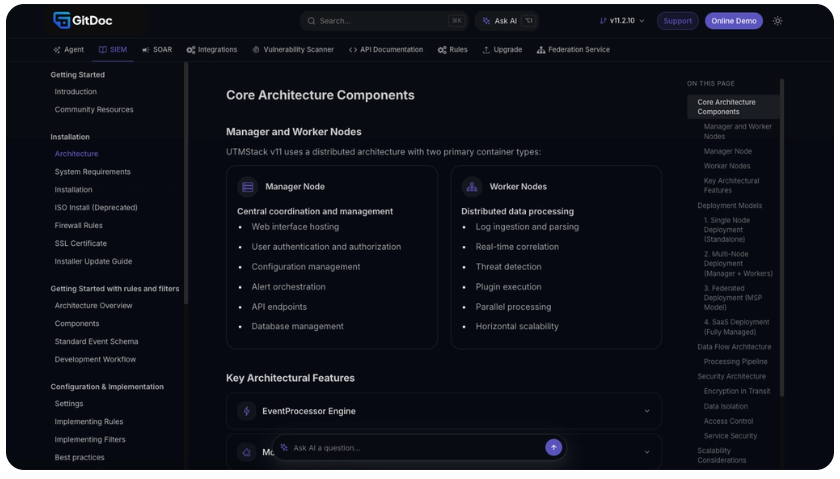
Documentation doesn’t have to look like it lives on someone else’s platform. GitDoc supports custom domains and branding. A SaaS company can publish docs under its own identity instead of a generic third-party URL.
This small detail matters more than it sounds. Customers trust a docs page under your own domain more than one that clearly belongs to a separate vendor. It’s a straightforward feature. But it’s a genuinely useful one for anything customer-facing.
SEO & GEO Features
Documentation can quietly become a source of organic traffic when it’s structured well. GitDoc includes SEO and GEO-related features meant to make documentation more discoverable. That covers both traditional search and newer AI-driven search environments.
Worth being clear-eyed here: SEO features built into a tool don’t guarantee rankings. Content quality, topical authority, technical SEO, and competition still decide what ranks. Think of this as a helpful foundation, not a shortcut around doing the work.
Git Backup & Version Control
Version control is a natural fit for developer-facing documentation. With Git-based workflows, teams can track changes to their docs over time. They can work inside an environment most developers already understand.
This matters most when more than one person touches the documentation. Or when you need to trace how a page changed and why. It’s a quieter feature than AI generation. But for teams collaborating on docs, it’s one of the more practically useful ones.
Best Use Cases
Based on everything covered so far in this GitDoc review, here’s where the platform tends to make the most practical difference:
- SaaS documentation for customer-facing help centers.
- API documentation built from OpenAPI specifications.
- Developer documentation for internal or open-source projects.
- Searchable knowledge bases.
- Product documentation covering features and workflows.
- AI-ready documentation meant to be queried by AI tools and agents.
Who Should Use GitDoc?
- Teams running a SaaS product with ongoing documentation needs.
- Developers maintaining an active software project.
- Companies that need API documentation.
- Teams already working inside GitHub.
- Anyone who wants to automate part of the documentation process.
- Businesses that want documentation accessible to AI systems.
- Teams that want documentation on a custom, branded domain.
Who Should Avoid GitDoc?
- People who only need basic note-taking.
- Anyone who rarely creates documentation.
- Teams without technical or product documentation needs.
- Users who don’t want or need AI-assisted writing.
- Small projects that don’t justify a specialized tool.
Is GitDoc Easy to Use?
GitDoc is built around modern software and documentation workflows. Developers will likely find the core concepts familiar. Some features lean more technical — GitHub integration, MDX, API access, and MCP. A complete beginner may need more time with those.
The honest answer is that ease of use depends on your background. If you already work with GitHub and technical tools, this will feel intuitive. If you’ve never touched an API spec or a Git repo, expect a real learning curve on the advanced features. The basic documentation generation stays approachable either way.
GitDoc Pros and Cons
Pros
- AI-assisted documentation generation.
- GitHub integration with auto-sync.
- Support for multiple source types (GitHub, PDF, URL, OpenAPI).
- OpenAPI documentation support.
- Combined AI and MDX editing.
- MCP and API access for programmatic use.
- Custom domain support.
- Built-in SEO and GEO features.
- Git-based version control.
Cons
- More technical than a simple documentation tool.
- AI-generated content still needs human review.
- Some features are overkill for small projects.
- Beginners may need time to learn the developer-focused workflow.
- Overall value depends heavily on how much documentation you actually produce.
GitDoc Pricing
Pricing is the part most people skip straight to. This GitDoc review wouldn’t be complete without a clear look at cost. Regular pricing and plan structure can change, so check the current listing before you commit to anything.
For a buyer, don’t just look at the sticker price. Match a plan to your real documentation volume: how many users, how many projects, and which integrations you’ll actually use. It’s easy to overpay for a tier built for a team five times your size.
AppSumo Lifetime Deal
GitDoc is also sold through a GitDoc AppSumo deal. That’s likely why a lot of people are reading this GitDoc AppSumo Review in the first place. The appeal of a lifetime deal is simple. You pay once instead of committing to a recurring subscription, as long as you stay within the terms of that tier.
Here’s how the current AppSumo tiers break down for the GitDoc lifetime deal:
Tier | Price |
Tier 1 | $69 |
Tier 2 | $129 |
Tier 3 | $279 |
Tier 4 | $399 |
Before you buy, check the live AppSumo listing for the exact limits attached to each tier. Deal terms on AppSumo change fairly often. The specifics of what each tier includes matter more than the headline price.
Which GitDoc Plan Should You Buy?
- Solo users and small projects: the entry-level tier is likely enough if your documentation needs are limited.
- Growing projects: a mid-tier plan makes more sense once you need more capacity or extra functionality.
- Agencies and larger teams: the higher tiers tend to offer better value across multiple client projects or heavier documentation workflows.
Anyone comparing tiers as part of their own GitDoc AppSumo Review should read the fine print on each one before buying. Limits on projects, users, and features can differ a lot between tiers.
The safest approach is buying the lowest tier that comfortably covers what you need. Upgrade later if it turns out you need more. Buying the top tier “just in case” rarely pays off with lifetime deals.
GitDoc vs GitBook vs Notion
Any honest GitDoc review has to put the platform next to its closest competitors. Here’s the side-by-side.
Feature | GitDoc | GitBook | Notion |
AI Documentation | Yes | Yes | Yes |
GitHub Workflow | Yes | Yes / Varies | Limited |
Auto-Sync | Yes | Varies | Limited |
OpenAPI Support | Yes | Yes / Varies | Limited |
Custom Domain | Yes | Yes | Limited |
AI Agent Support | Yes | Varies | Varies |
MCP/API Access | Yes | Varies | Varies |
Developer Focus | High | High | Medium |
General Notes | Limited | Limited | Excellent |
The real difference between these three comes down to positioning, not raw feature counts. Notion is built for flexible, general-purpose workspaces. Documentation is just one piece of a bigger system there. GitBook has long been known for clean developer and product documentation. GitDoc’s angle is combining AI-driven generation with GitHub-native workflows and AI-agent access. That’s a narrower pitch than either of the other two, but a more specific one.
GitDoc Alternatives
No GitDoc review would be complete without covering what else is out there. If GitDoc doesn’t line up with what you need, a few alternatives are worth a look.
GitBook is worth considering if polished, purpose-built developer and product documentation is your main priority. Notion fits better if you want one general workspace that doubles as a knowledge base alongside everything else your team does. Plain Markdown plus a GitHub workflow still makes sense for some developers. It’s a good fit if you want full control and don’t need an AI layer at all.
Which one actually fits comes down to what you’re optimizing for: simplicity, collaboration, developer control, automation, or publishing polish. Nobody wins on all five at once.
Is GitDoc Worth It?
So, is this GitDoc review landing on a yes or a no?
For developers, SaaS companies, API teams, and anyone maintaining documentation regularly, GitDoc has a genuinely solid feature set. It mixes AI generation, GitHub sync, multiple source types, custom publishing, and AI-agent support. That pushes it well past a basic documentation editor.
The value case gets stronger with the GitDoc lifetime deal on AppSumo. That’s especially true if you plan to use it for years, not months. Paying once for a tool you’ll rely on long-term changes the math in your favor.
Where it’s not worth it: if your documentation needs are occasional or simple, you’re likely paying for capability you won’t use. A lighter tool would probably serve you just as well. Even a well-organized Notion page might do the job, for less money and less setup.
Final Verdict
GitDoc takes a specific, developer-first approach to documentation. It combines AI generation, GitHub workflows, API access, modern editing, and AI-agent compatibility into one platform. It’s not trying to be everything to everyone. Honestly, that focus works in its favor.
The strongest fit is developers and SaaS teams. They already have technical content sitting around. They want a faster path to documentation that stays current. More features don’t automatically mean better value, though. Before buying, be honest about how much documentation you actually produce. Compare the tiers carefully.
If a modern, AI-assisted, developer-oriented documentation platform is what you’re after, GitDoc earns a spot on your shortlist. This GitDoc review comes down in favor of it. That’s true for the right use case: technical teams with real, ongoing documentation needs. For anyone with lighter needs, simpler tools are probably a better fit.
Frequently Asked Questions (FAQ)
What is GitDoc?
GitDoc is an AI-powered documentation platform. It helps create, manage, edit, and publish documentation from sources like GitHub repositories, URLs, PDFs, and OpenAPI specifications.
Is GitDoc good for developers?
Yes. GitHub integration, MDX support, API documentation tools, Git-based workflows, and AI-agent features make it especially relevant for developers.
Does GitDoc support GitHub?
Yes. GitHub integration is one of GitDoc’s core features. It connects documentation directly to development workflows.
Does GitDoc use AI?
Yes. GitDoc AI helps generate and edit documentation from your source material.
Does GitDoc support OpenAPI?
Yes. GitDoc can generate documentation directly from OpenAPI specifications.
Does GitDoc have a lifetime deal?
Yes, GitDoc has been offered through a GitDoc AppSumo deal. Check the current AppSumo listing for the latest pricing, limits, and terms before buying.
Is GitDoc better than Notion?
It depends on your needs. Notion suits general-purpose workspaces and broad knowledge management. GitDoc is more focused on technical and developer documentation.
Is GitDoc better than GitBook?
Neither is automatically better. GitDoc may be the stronger pick if you specifically want its AI, GitHub, and MCP-related capabilities.
Who should buy GitDoc?
Developers, SaaS founders, technical teams, and agencies. Any business that needs to create and maintain technical documentation is likely to benefit most.
Is GitDoc worth it?
For users who need AI-assisted, developer-focused documentation and will actually use the integrations, yes. That’s the conclusion of this GitDoc review. For simple or occasional documentation needs, a cheaper tool may serve you better.
Is this GitDoc Review 2026 based on real testing?
This GitDoc Review 2026 is based on official product information. It also draws on public details about GitDoc’s features, workflow, and AppSumo listing. Any claim that couldn’t be verified is marked as such, not stated as fact.