
Running a Facebook Page takes time. You need post ideas. You need captions. You need a posting schedule. And you need some way to check if any of it is working.
Many Page owners now turn to AI tools for help. One name that comes up is Manus AI. This guide covers how to use Manus AI for Facebook Page management. We will look at what the tool can really do, what it cannot do on its own, and how to build a simple workflow around it.
One thing needs to be said first. AI tools can help you plan, write, and organize. They should not replace your judgment. And you should never share your Facebook password with any AI tool. Not ever.
What Is Manus AI?
Manus AI is an AI agent. An AI agent is a tool built to work through tasks in steps, not just answer one question and stop.
A basic chatbot gives you one reply to one prompt. An AI agent can do more. It can break a bigger task into smaller steps. It can research a topic, write a draft, organize the result, and hand it back to you.
This matters for Facebook Page management. A basic chatbot might write you one caption if you ask for one. An agent-style tool can take a wider request, like “help me plan next week’s posts,” and work through it in stages.
People use tools like this for social media work because planning by hand takes real time. Coming up with ideas, writing captions, and tracking what worked before is a lot to manage. This is true even more for a small business owner running the Page alone. AI Facebook Page management tools, including Manus AI social media management features, aim to take some of that load off your plate. They are not meant to replace the person running the Page.
Can Manus AI Help With Facebook Page Management?
Yes, but with some limits worth knowing up front. The clearest use cases sit on the planning and research side:
- Content planning and content pillars.
- Post ideas across different formats.
- Caption drafting.
- Content calendars.
- Audience research.
- Competitor and content research.
- Performance summaries, if you give it the numbers.
- General task organization for social media work.
Here is where people get confused. AI-assisted work is not the same as a direct Facebook Page action. Manus AI can help you draft a caption. It does not log into your Facebook account and post that caption on its own, unless you set up a verified integration for that. Even then, you should still review the post before it goes live. Think of any of the AI tools for Facebook you try as an assistant sitting next to you. It is not a hands-off manager running your Page while you sleep.
How to Use Manus AI for Facebook Page Management
Here is a simple, step-by-step way to build this into your routine.
Step 1: Define Your Facebook Page Goal
Start before you open any AI tool. Ask what the Page is for. Is it there to sell a product? To build a local community? To support a service business? To share tips and teach people something?
Think about your audience too. What do they care about? Write this down in a few sentences. Later, you can hand this summary to Manus AI so the output stays useful instead of generic.
Step 2: Create a Content Strategy
Once your goal is clear, ask the AI to sketch out a content strategy. This can include a few content pillars, which are the 3 to 5 main topics you will keep coming back to. It can also include weekly themes and general post types.
Here is a simple example prompt:
“I run a Facebook Page for a small bakery in [city]. My audience is local families and coffee shop regulars. Suggest 4 content pillars and 3 weekly post types for Facebook content creation with AI.”
Treat the result as a starting point. Adjust it based on what you already know about your customers.
Step 3: Generate Facebook Post Ideas
This step is where AI Facebook post ideas tend to help the most. Brainstorming from scratch gets tiring fast. Ask for ideas across a mix of formats so your Page does not feel repetitive:
- Educational posts: a quick tip tied to your field.
- Tips: short advice people can use right away.
- Questions: something that invites a comment, like asking followers what they prefer.
- Product-related content: a feature explained in plain words.
- Promotional posts: a clear offer, without big claims.
- Community posts: local events, behind-the-scenes moments, or a customer shoutout.
Ask for 10 to 15 ideas at once. Pick the ones that fit your brand voice. Not every idea will work, and that is fine.
Step 4: Write Facebook Captions
Once you pick an idea, ask Manus AI to draft a short caption around it. Facebook captions work best when they are short, easy to scan, and end with something that invites a reply.
Here is a sample prompt:
“Write a short, friendly Facebook caption for a post about our weekend bread sale. Keep it under 40 words and end with a question.”
Always read the draft out loud before you post it. If it sounds stiff, rewrite the parts that do not sound like you.
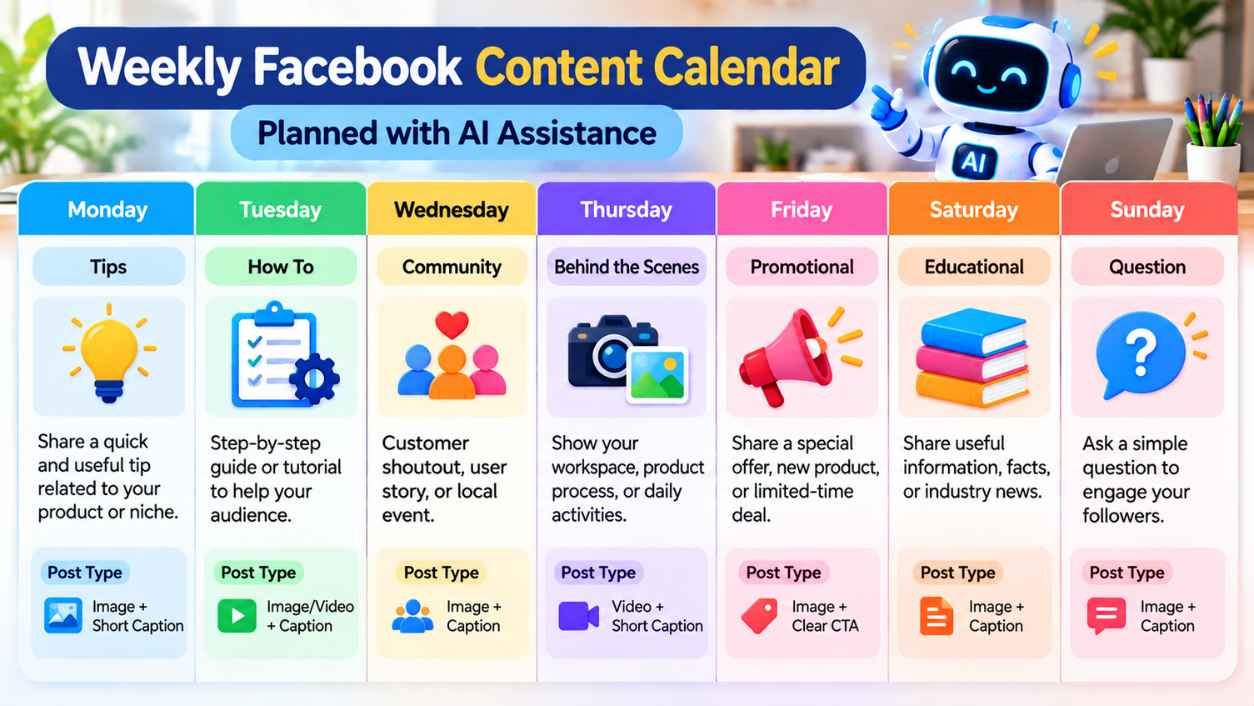
Step 5: Build a Facebook Content Calendar
A Facebook content calendar keeps you from scrambling for ideas every morning. Ask the AI to lay out a week or a month of post topics. Then fill in the real captions as you go.
Day | Content Pillar | Post Idea |
Monday | Tips | Quick tip tied to your product |
Wednesday | Community | Customer shoutout or local event |
Friday | Promotional | Weekend offer or new item |
Sunday | Question | Ask followers a simple opinion question |
This table is just a starting template. Change the days and pillars to match your own posting habits.
Step 6: Research Your Audience
Ask Manus AI to help organize what you already know, or suspect, about your audience. This can include common questions they ask, topics they engage with, and general interests tied to your niche. Use this as a starting point for research, not a full replacement for it.
Check anything the AI gives you against your own Facebook Page Insights, your customer chats, and your comments. AI research reflects general patterns. It does not know your exact followers unless you tell it what you have already seen.
Step 7: Analyze Facebook Page Performance
If you export or copy your own numbers, such as reach, engagement, comments, shares, clicks, and follower growth, Manus AI can help you sum up what the data shows. It can also help spot patterns across a few weeks. This can save you time compared to scrolling through Insights by hand.
One thing to be clear about: Manus AI does not pull data from Facebook Insights on its own unless that exact feature exists and is set up on your end. If you are not sure whether that is available, check the tool’s current documentation instead of assuming.
Step 8: Improve Existing Facebook Content
You do not need to start from zero each time. Paste an old caption into the tool. Ask for feedback on clarity, structure, readability, or whether the call to action is strong enough. This kind of edit often improves a post more than writing a brand-new one from scratch.
Useful Manus AI Prompts for Facebook Page Management
Here are 10 prompts you can adapt for your own Page:
- “Suggest 10 Facebook post ideas for a [type of business] targeting [audience].”
- “Build a 7-day Facebook content calendar with a post type for each day.”
- “Write a short, casual Facebook caption about [topic], under 40 words.”
- “Draft an educational Facebook post that explains [a simple idea in your field].”
- “Write 5 engagement questions I can post to get more comments.”
- “Suggest 3 promotional post ideas for [product or service] that do not sound pushy.”
- “List common questions people in [your niche] might ask on Facebook.”
- “List 5 content angles other brands in [your industry] often use, based on general patterns.”
- “Here is my post performance data for the last 4 weeks: [paste numbers]. Sum up what stands out.”
- “Plan a month of Facebook content themes around [a season or business goal].”
Keep your prompts specific. The more you tell the AI about your business and your audience, the more useful the answer tends to be.
Example Facebook Content Workflow With Manus AI
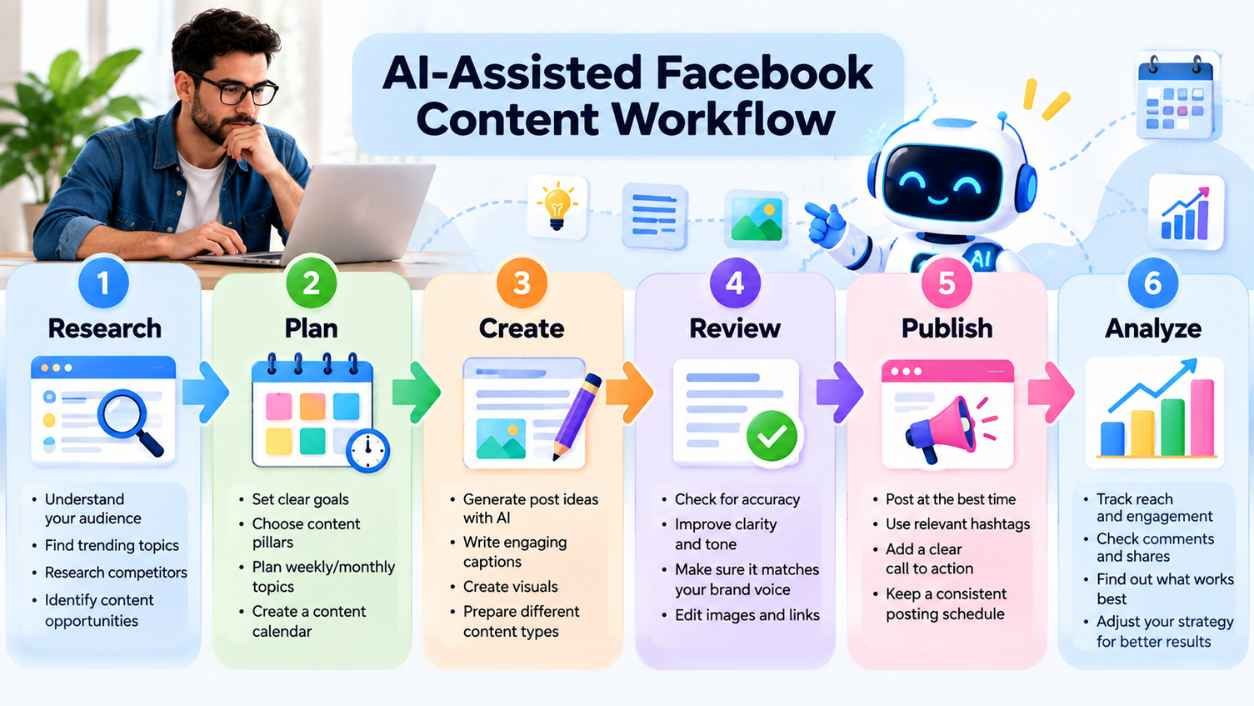
Here is a simple way to shape your week:
Research → Plan → Draft → Review → Edit → Publish → Analyze
- Research: Jot down notes on what your audience responds to.
- Plan: Ask Manus AI to help map out post topics for the week.
- Draft: Get a first pass at captions and ideas.
- Review: Read everything with a critical eye. Cut anything that feels off-brand.
- Edit: Fix the tone, shorten long sentences, correct anything that is wrong.
- Publish: Post it yourself, on your own schedule.
- Analyze: At the end of the week, check what worked. Use that to shape next week’s plan.
Benefits of Using AI for Facebook Page Management
Used this way, AI social media management tools bring a few real perks:
- They save the time you would spend staring at a blank page for ideas.
- They give you more options than you might think of on your own.
- They make content planning feel less overwhelming.
- They help you organize a lot of information, like audience notes or performance numbers.
- They support steadier posting, since you are not starting from scratch each time.
None of this promises more engagement, more followers, or more sales. Your results still depend on your product, your audience, and how well you edit and shape what the AI gives you.
Limitations of Using Manus AI for Facebook Pages
A few honest limits worth keeping in mind:
- AI tools can make mistakes, including factual ones.
- What the AI writes may need fact-checking against real sources.
- Facebook’s own features and tools can change over time.
- Some actions likely need your manual approval or setup.
- AI does not replace human judgment about your brand and your audience.
- Privacy and account safety always matter, most of all with tools that touch your business accounts.
Best Practices for Using AI With Facebook
- Review every AI-written post before it goes live.
- Fact-check anything that looks like a stat or a claim.
- Protect your login details. Never share your Facebook password with an AI tool.
- Follow Meta’s Facebook Page rules and ad policies.
- Skip spammy posting patterns, even if the AI suggests a lot of content at once.
- Skip claims about your product that you cannot back up.
- Keep your brand voice steady, even when you start from an AI draft.
- Do not post sensitive business or customer details without checking them first.
Can AI Fully Automate a Facebook Page?
Not in a way you should rely on without a person watching. There is a real gap between these four things:
- AI-assisted management: AI helps plan and draft. A person makes the final call.
- Workflow automation: scheduling tools publish content you already approved, at set times.
- Direct social media publishing: an AI tool posts to your Page with no human check.
- Human review: the step that should sit between any AI draft and your live Page.
Full automation with zero human review is not something to lean on. Be careful with claims like “100% automated” or “guaranteed growth.” Treat them with doubt unless they are backed by current, verified facts from the tool itself.
Frequently Asked Questions
Can Manus AI create Facebook posts?
It can help draft post ideas and captions for you to check and publish yourself. Whether it can publish on its own depends on what integrations and permissions are set up and verified.
Can Manus AI manage a Facebook Page automatically?
Not fully on its own. It can help with planning, drafting, and organizing tasks. Human review still matters at every step.
Can Manus AI create a Facebook content calendar?
Yes. It can help you lay out post topics and themes across a week or a month. You then fill in the details based on what you know about your audience.
Can AI analyze Facebook Page performance?
It can help sum up performance data you give it, such as reach, engagement, and follower growth. It does not pull this data from Facebook on its own unless a specific, verified integration exists.
Is Manus AI useful for small businesses?
It can be, mostly for saving time on planning and drafting. Small business owners who run a Page alone often get the most value from the organizing side of these tools.
Do I need to give Manus AI my Facebook password?
No. Never share your Facebook login details with an AI tool, or with any other third-party tool.
Can AI replace a social media manager?
Not fully. It can take on a good share of the planning and drafting work. But judgment about brand voice, audience relationships, and strategy still benefits from a real person.
Conclusion
Manus AI can support Facebook Page management in real, useful ways. It can help with planning content, brainstorming post ideas, drafting captions, building calendars, organizing audience research, and summing up performance data you give it. What it should not do is run your Page with no one watching, or replace your own judgment about your brand and your audience. Use it as a planning partner. Review everything before it goes live. Keep your login details to yourself. AI for the heavy lifting of planning, and a person for the final call: that mix is what makes this kind of AI tool for Facebook worth adding to your routine.