AI tools are everywhere now. People use them to write emails, edit photos, research topics, organize their schedules, answer customer questions, and even help with coding. But if you’ve tried more than one AI tool, you’ve probably noticed something confusing: they don’t all do the same things. One tool might focus entirely on writing. Another might generate images. A third might do ten different jobs at once.
So what are the main features and functionality of AI tools, really? This guide breaks it down in plain language, without hype and without pretending every tool can do everything. By the end, you’ll have a clearer sense of what to look for the next time you’re choosing one.
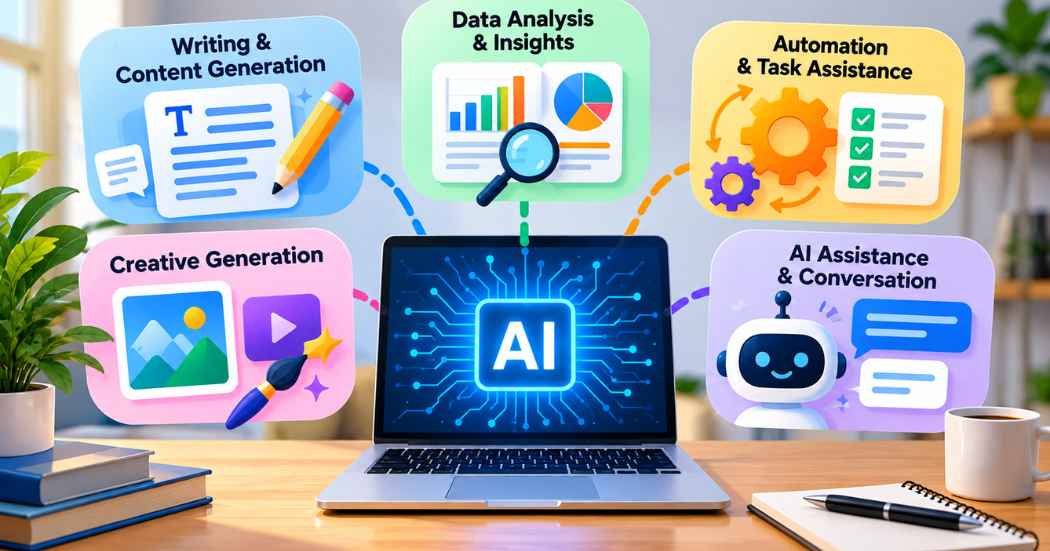
Quick answer: The five common themes of AI tool functionality are content generation, information processing, automation, creative generation, and personalized assistance. Not every tool includes all five. Some focus on just one.
What Are AI Tools?
An AI tool is a piece of software built around an AI model or AI-powered system. Instead of following a fixed set of rules for every situation, it processes what you give it (words, images, files, data) and produces a response based on patterns it learned during training.
You interact with most AI tools through a chat box, a form, or a simple interface where you type instructions or upload a file. The tool then does something with that input: writes a paragraph, edits a photo, summarizes a report, or suggests next steps.
Not every AI tool is the same shape. Some are narrow and do one thing well, like a tool built only for writing product descriptions. Others are broader and combine several functions, like a workspace app that writes, summarizes, and organizes tasks all in one place. That’s part of why AI tools can feel so different from each other: a writing assistant and a video editor might both be called “AI tools,” but they solve completely different problems.
Common examples include:
- Writing assistants
- Image generators
- Video tools
- Research and summarization tools
- Coding assistants
- Productivity and planning tools
- Customer support chatbots
At their core, all of these are software applications that use AI to perform or assist with a specific task. The task is what varies.
The Main Features and Functionality of AI Tools
Most AI tools you’ll come across fall into a handful of broad categories. A tool might only cover one of these, or it might mix several together.
- Content generation
- Data analysis and information processing
- Automation and task assistance
- Creative generation
- Personalization and intelligent assistance
Let’s go through each one.
1. Content Generation
This is probably the most familiar AI feature, since it’s what most people first try.
Text Generation
Many AI tools can draft text based on a short prompt. That might include blog outlines, first drafts of articles, social media captions, emails, product descriptions, or quick summaries. Some people also use AI to brainstorm ideas when they’re stuck.
It’s worth saying clearly: AI-written text is a starting point, not a finished product. You should still check it for accuracy, tone, and originality before using it anywhere that matters.
Content Editing
Beyond generating new text, AI tools can also help with editing existing writing. That includes catching grammar and spelling mistakes, improving sentence clarity, adjusting readability, rewriting awkward phrasing, or condensing a long piece into a short summary. These suggestions are useful, but they’re still suggestions. A human should review the final version before it goes out.
Translation and Language Support
Some AI tools can translate text or help rewrite it in a different language. This works reasonably well for everyday content, but for anything professional, legal, or high-stakes, it’s worth having a person who knows the language confirm the translation is accurate.
2. Data Analysis and Information Processing
AI tools aren’t just for writing. A lot of them help people work through information more efficiently.
Summarizing Information
AI can condense long documents, reports, meeting notes, or articles into shorter summaries. This is genuinely useful when you’re short on time, but it comes with a caveat: for anything important, go back and check the original source. Summaries can miss nuance or leave out details that matter to you specifically.
Finding Patterns
Some AI systems can look at structured data and point out patterns or relationships. This might show up in sales numbers, customer feedback, website traffic, or survey responses. It’s helpful for spotting trends you might otherwise miss, but it isn’t a guarantee of perfect accuracy. Treat pattern suggestions as a starting point for further review, not a final answer.
Organizing Information
AI can also help classify, sort, or tag large amounts of information, which makes it easier to search through or make sense of later.
3. Automation and Task Assistance
A lot of the appeal of AI tools comes from cutting down on repetitive work.
Repetitive Tasks
This includes things like drafting routine emails, generating reports, creating task lists, or organizing notes. None of it is glamorous, but it’s exactly the kind of work AI tends to handle reasonably well.
Workflow Assistance
Some AI tools go a step further and help connect different steps of a process, or assist with planning a multi-step task. That said, not every AI tool can reach into other apps and take action for you automatically. Whether that’s possible depends entirely on the specific tool, what integrations it supports, and what permissions you’ve granted it. Don’t assume a tool can automate something in another platform just because it’s described as “AI-powered.”
AI Agents
You’ll increasingly hear the term “AI agent.” In simple terms, an agent is designed to work through multiple steps toward a goal, rather than just answering a single question and stopping. How well this actually works varies a lot from tool to tool, and it’s still an area where capabilities differ widely.
4. Creative Generation
AI is also used for creative work, though results here vary more than people sometimes expect.
Image Generation
Some AI tools can create images from a text description. This might be used for illustrations, marketing graphics, concept art, or social media visuals. Before using AI-generated images commercially, check the licensing terms of the tool you’re using. Rules around usage rights differ from one platform to another.
Video Generation
AI tools may assist with parts of the video process, such as writing scripts, building storyboards, generating captions, creating voiceovers, or handling some visual elements and edits. It’s not accurate to say AI can automatically produce a fully polished, professional video every time. Results depend heavily on the tool and the complexity of what you’re trying to make.
Audio and Voice
Some AI tools can generate or edit audio, including synthetic speech or voice content. If you’re working with someone’s actual voice or likeness, think carefully about consent and any rules that apply, since this is an area with real ethical and legal considerations.
5. Personalization and Intelligent Assistance
The last major category is about tailoring AI responses to you specifically.
Personalized Recommendations
AI systems can suggest content, products, or actions based on the information available to them, like your past activity or stated preferences. You’ll see this in learning platforms, content recommendations, and productivity suggestions. Keep in mind that how much personal data a tool uses, and how it’s handled, varies by platform.
Conversational Assistance
Chat-based AI tools let you ask questions and get answers in plain language, without needing to learn special commands or menus.
Context-Aware Assistance
More advanced AI systems can use the context of your conversation, files you’ve uploaded, or other connected information to give more relevant answers. What exactly a tool can access, and how much it remembers, depends on the specific tool and its settings.
How Do AI Tools Work?
At a basic level, most AI tools follow a similar process:
User Input → AI Processing → Generated Output → Human Review
- You give the tool instructions or data.
- The AI system processes what you provided.
- It generates a response or output.
- You review the result and make any needed changes.
Different tools rely on different underlying models, data sources, and technology, which is part of why results can vary so much between them. You don’t need to understand the technical details to use these tools well. What matters more is understanding that step four, human review, isn’t optional.
Common Types of AI Tools
AI Tool Type | Common Uses |
AI Writing Tools | Writing and editing |
AI Image Tools | Image generation and editing |
AI Video Tools | Video creation and editing |
AI Research Tools | Research and summarization |
AI Coding Tools | Code assistance |
AI Productivity Tools | Planning and organization |
AI Customer Support Tools | Customer questions and support |
AI Marketing Tools | Content and marketing tasks |
Many tools don’t fit neatly into just one row. A writing tool might also help with marketing content, and a productivity tool might include some research features.
What Should You Look for in an AI Tool?
A few practical things to weigh before choosing one:
Ease of use. Can you figure out the interface without a manual?
Features. Does it actually do what you need, or just what sounds impressive?
Output quality. Are the results genuinely useful, or do they need heavy rework?
Privacy. Understand how your data is stored and used before uploading anything sensitive.
Pricing. Most tools offer a free tier with limits, plus paid plans for more usage or features. Compare what you’d actually need against what’s included.
Integrations. Some tools connect with other software you already use. Others don’t. Check before assuming.
Human control. You should always be able to review, edit, and approve anything important before it goes out into the world.
Benefits of AI Tool Features
Used well, AI tools can realistically help with:
- Saving time on repetitive tasks
- Generating ideas when you’re stuck
- Organizing large amounts of information
- Supporting content creation
- Making it easier to work through big documents or datasets
- Improving certain parts of a workflow
- Giving beginners a starting point they wouldn’t otherwise have
That said, AI doesn’t always save time, and it doesn’t always produce better results than doing the task yourself. It depends on the task, the tool, and how much editing the output needs.
Limitations of AI Tools
This part matters just as much as the benefits.
AI can make mistakes. AI-generated information can be wrong, sometimes confidently so. Always double-check anything important.
Output needs review. Nothing generated by AI should go out unchecked, especially if it’s going to customers, clients, or the public.
AI doesn’t always understand context. Vague instructions can lead to answers that miss the point entirely.
Privacy concerns are real. Don’t share sensitive information with a tool unless you understand its privacy practices.
Costs can add up. Some of the more useful features are often locked behind paid plans.
Features change often. AI tools get updated frequently, so what a tool could or couldn’t do last month might be different today.
How to Use AI Tools Responsibly
- Give clear, specific instructions.
- Review everything the AI generates.
- Fact-check anything important before relying on it.
- Keep sensitive information out of prompts unless you’re sure it’s safe.
- Check copyright and licensing rules, especially for images and audio.
- Follow the platform’s terms and rules.
- Keep a human involved in decisions that actually matter.
- Never present unverified AI output as established fact.
AI Tools vs Traditional Software
Feature | AI Tools | Traditional Software |
Natural language input | Often available | Usually limited |
Content generation | Common in many AI tools | Usually requires manual work |
Automation | Depends on integrations | Usually rule-based |
Adaptability | Can respond to instructions | Often follows fixed functions |
Human review | Still important | Usually important |
These aren’t always rivals. A lot of modern software now blends both approaches, using AI features inside otherwise traditional applications.
Are AI Tools Replacing Human Work?
This is a common worry, and the honest answer is: it depends on the industry and the specific job, and nobody has a clean, universal answer to it.
AI tools are generally built to assist with tasks rather than take over a whole job. In practice, that means some repetitive parts of work get automated, while judgment, expertise, and decision-making still tend to rest with people. New workflows are forming around AI-human collaboration rather than pure replacement, though how that plays out will keep shifting as the tools themselves change. Be skeptical of anyone who tells you AI will replace everyone, in every field, on a fixed timeline. That’s not a claim anyone can back up right now.
Frequently Asked Questions
What are the main features of AI tools?
Common features include content generation, data analysis, automation, creative generation, and personalized assistance, though most tools only cover some of these.
What can AI tools do?
Depending on the tool, they can write and edit text, generate images or video, summarize documents, automate repetitive tasks, and answer questions conversationally.
What is AI functionality?
It refers to the specific tasks an AI system is built to perform, such as generating text, analyzing data, or creating images.
What are the five main functions of AI tools?
Content generation, information processing, automation, creative generation, and personalization.
Are all AI tools the same?
No. Some focus on a single task, while others combine multiple functions into one platform.
Are AI tools free?
Many offer a free plan with limits, plus paid tiers for more features or usage.
Can AI tools make mistakes?
Yes. AI-generated output can be inaccurate, so it should always be reviewed before use.
Should I verify AI-generated information?
Yes, especially for anything factual, professional, or public-facing.
Are AI tools useful for small businesses?
They can help with tasks like drafting content, organizing information, and handling routine questions, though results vary by tool and use case.
How do I choose the right AI tool?
Look at ease of use, the specific features you need, output quality, privacy practices, pricing, and whether it integrates with tools you already use.
Conclusion
AI tools cover a wide range of features: generating content, processing information, automating repetitive work, creating images and video, and offering personalized assistance. No single tool does all of this equally well, and that’s fine. The right choice depends on what you’re actually trying to do, not on which tool has the longest feature list.
Whatever you use, the same rule applies across the board: AI can speed up parts of your work, but it still needs a human checking the results. Understanding what these tools are built for, and where their limits are, makes it a lot easier to use them well.