
If you want to know how to use AI for keyword research, you are in the right place. AI can help you find keyword ideas faster, sort them into groups, and plan your blog posts. But it cannot tell you exact search numbers or promise rankings.
In this guide, you will learn what AI keyword research is, how to do it in five simple steps, and how to check the results. You will also see examples, common mistakes, and answers to common questions.
The likely search intent here is informational. You want to learn a process you can follow today. So this guide is practical and focused on steps.
What Is AI Keyword Research?
Keyword research means finding the words and phrases people type into search engines. When you know these phrases, you can write articles that answer real questions.
AI keyword research means using an AI chat tool to help with that work. You give the tool a topic. It gives you ideas, questions, and ways to group them.
Here is what AI is good at:
- Suggesting many keyword ideas quickly.
- Turning one broad topic into many smaller topics.
- Sorting keywords by what the searcher wants.
- Grouping related keywords into content clusters.
Here is what AI cannot do well:
- It cannot see live search data on its own.
- It may give you keywords that nobody searches for.
- It may sound sure about things it does not know.
Think of AI as a helpful assistant. You still make the final choices.
Why Is AI Keyword Research Important?
Many beginners get stuck at the start. They have a blog topic, but they do not know what to write about. Or they write an article and nobody finds it because it does not match what people search for.
AI can help in a few practical ways:
- It saves time. A list that takes an hour by hand can take a few minutes.
- It helps you think wider. You may see angles you did not think of.
- It helps you plan. You can turn a list of ideas into a clear set of articles.
One warning: a keyword idea from AI is only an idea. A high-volume keyword does not mean you will rank for it. Many websites may already cover it well. That is why the checking step later in this guide matters.
Two Ideas to Know First
Search Intent
Search intent is the reason behind a search. Most searches fall into four types:
- Informational: The person wants to learn something. Example: “how to repot a snake plant.”
- Navigational: The person wants a certain website. Example: “Google Search Console login.”
- Commercial: The person is comparing options. Example: “best beginner houseplants.”
- Transactional: The person is ready to act or buy. Example: “buy a small watering can.”
If your article does not match the intent, readers leave. Someone who searches “how to repot a plant” wants steps, not a sales page.
Broad Keywords and Long-Tail Keywords
A broad keyword is short and general, like “plants.” Many people search it, but the reason behind it is unclear. Many big sites compete for it.
A long-tail keyword is longer and more specific, like “low light plants for a small apartment.” Fewer people search it, but the reader’s need is clear. For new websites, long-tail keywords are often a more realistic place to start. This is a general guideline, not a promise of results.
How to Use AI for Keyword Research, Step by Step
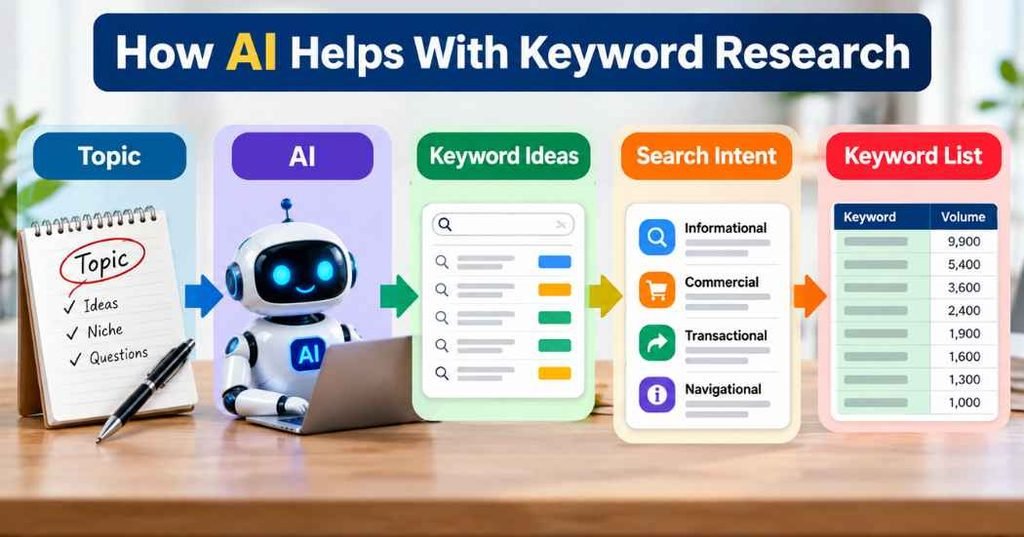
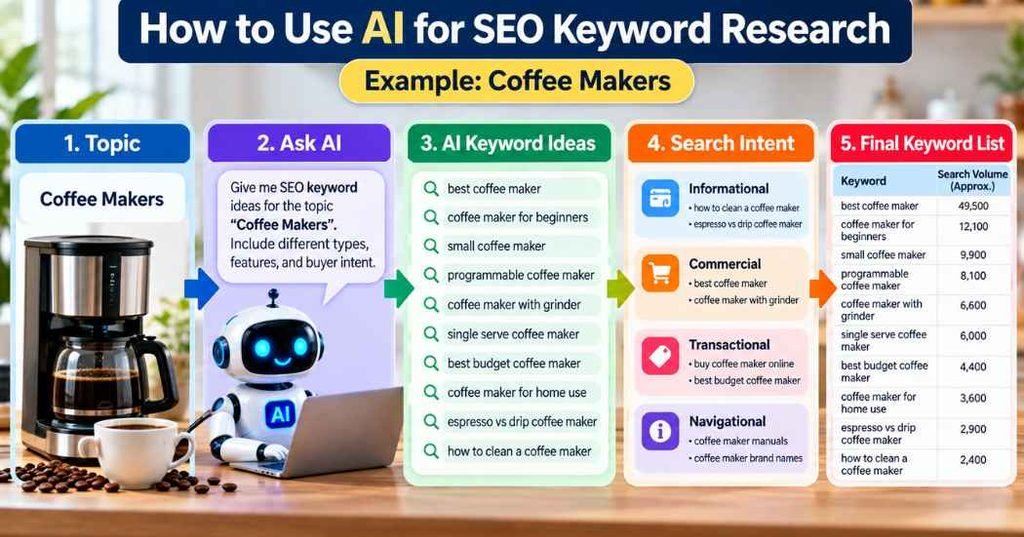
Step 1: Decide Your Topic and Your Reader
Before you open any AI tool, write down two things:
- Your main topic, such as “houseplants for beginners.”
- Who you are writing for, such as “people who are new to plants and have small homes.”
This keeps the AI from giving you random ideas. The clearer your input is, the more useful the output will be.
Step 2: Ask AI for Keyword Ideas
Now ask the AI to brainstorm. Give it details. Here is a sample prompt:
“I run a beginner blog about houseplants. Give me 30 keyword ideas that new plant owners might search for. Include questions and long-tail phrases. Keep the ideas family-friendly.”
You can run the prompt more than once with small changes. Try “focus on plant care problems” or “focus on plants for low light.” Each version gives you new ideas.
You can also ask for related questions:
“What questions might a beginner ask about watering houseplants?”
This works like an AI keyword generator, but you steer it with your own topic and reader.
Step 3: Sort the Keywords by Search Intent
Next, paste your list back into the AI and ask it to sort each keyword by intent:
“Sort these keywords into informational, commercial, and transactional. Put each keyword in one group.”
Then read the results yourself. AI sometimes puts a keyword in the wrong group. If a phrase starts with “how,” “why,” or “what is,” it is usually informational. If it has “best” or “vs,” it is usually commercial.
This step helps you decide what type of article to write. Informational keywords fit how-to guides. Commercial keywords fit comparison posts.
Step 4: Find Long-Tail Keywords and Build Clusters
Pick one broad keyword and ask AI to make it more specific:
“Give me 15 long-tail versions of ‘watering houseplants.’ Focus on beginner problems.”
Then ask it to group your keywords into clusters. A cluster is a set of related articles around one main topic. For example:
- Main topic: Watering houseplants
- Related articles: How often to water a snake plant, signs of overwatering, how to water plants while on vacation, best time of day to water
The main article covers the big topic. The smaller articles cover the details. You can link them together so readers can move from one to the next.
Step 5: Check Your List With Real SEO Data
This is the most important step. AI writes from patterns in its training. It does not know today’s search numbers. So check your list with real tools.
Here are some ways to do it:
- Google autocomplete: Type your keyword into Google and see what it suggests.
- “People also ask” boxes: These show questions real people search for.
- Google Keyword Planner: A free tool from Google Ads that gives search volume ranges.
- Google Trends: Shows how interest in a topic changes over time.
- Google Search Console: If your site is live, it shows which searches already bring people to you.
- Paid SEO tools: Many offer difficulty scores and more detail. Check what each one offers before you pay.
Also search each keyword yourself. Look at the top results. Ask: What kind of pages are they? Are they guides, lists, or product pages? Can I write something clearer or more helpful? If the results do not match your planned article type, change your plan.
Practical Examples
These examples are made up to show the process. They are not real search data.
Example 1: Turning a broad topic into long-tail ideas
Broad topic: “houseplants”
Ideas AI might suggest:
- how often to water a snake plant
- easy houseplants for low light
- why are my plant’s leaves turning yellow
- best pots for small plants
Each one is more specific and easier to write a focused article about.
Example 2: Matching intent to article type
- “How to repot a plant” is informational. Write a step-by-step guide.
- “Best beginner plants” is commercial. Write a list with clear reasons for each pick.
- “Plant care for beginners checklist” is informational. Write a simple checklist article.
Example 3: A small content cluster
Main article: “Houseplant Care for Beginners”
Supporting articles:
- How to water houseplants
- How much light do houseplants need?
- How to fix yellow leaves
- Best soil for indoor plants
Each supporting article links back to the main one.
Common Mistakes to Avoid
Trusting AI numbers. If an AI tool gives you a search volume number, treat it as unverified. Check it in a real keyword tool.
Copying the list without checking. Some AI ideas are odd or too broad. Remove what does not fit your reader.
Ignoring search intent. A good keyword with the wrong article type will not satisfy the reader.
Chasing only big keywords. Short, popular keywords are often very competitive. Mix in long-tail phrases.
Stuffing keywords into the article. Write for people. Use the keyword where it fits and use related words the way you would in normal speech.
Letting AI write everything. AI can help with ideas. Your article still needs real knowledge, clear examples, and your own checking.
Expecting fast results. No keyword list can promise rankings, traffic, or income. SEO takes time, and results vary.
Useful Tips for Beginners
- Start small. Pick one topic and build a list of 20 to 30 keywords before you expand.
- Give AI more context. Tell it your topic, your reader, and your goal. Vague prompts give vague answers.
- Ask for questions. Question keywords often show clear intent and make good headings.
- Keep a simple spreadsheet. Write down each keyword, its intent, the article type, and notes from your checking.
- Read the search results. Ten minutes looking at what already ranks teaches you a lot.
- Use your own knowledge. If you know a topic well, add details AI would miss.
- Review your work later. Search trends change. Look at your list again every few months.
Frequently Asked Questions
Can AI do keyword research on its own?
Not fully. AI can give ideas and help you organize them. It does not have reliable live search data. You still need a keyword tool or Google’s own tools to check the results.
Is AI keyword research free?
Many AI chat tools have free versions, and Google offers free tools like Keyword Planner, Google Trends, and Search Console. Features and limits change, so check the current details on each tool’s website.
Which AI tool is best for keyword research?
There is no single best tool for everyone. Any good AI chat tool can brainstorm ideas. What matters more is how clearly you write your prompt and whether you check the results with real data.
Can AI tell me how hard a keyword is to rank for?
It can guess, but it cannot measure it. Difficulty depends on the pages already ranking and many other factors. Use an SEO tool for a better estimate, and look at the search results yourself.
What is the difference between a broad keyword and a long-tail keyword?
A broad keyword is short and general, like “plants.” A long-tail keyword is longer and more specific, like “easy plants for a dark bedroom.” Long-tail keywords usually show clearer intent.
How many keywords should I target in one article?
Pick one main keyword and a few closely related phrases. Then write the article to fully answer the reader’s question. You do not need to use every keyword on your list.
Will using AI for keywords help me rank on Google?
It may help you plan better, but it does not guarantee rankings. Rankings depend on content quality, competition, your site, and many other factors.
Is it okay to use AI-generated keyword ideas for a website?
Yes. Keyword ideas are just research. What matters is that your final content is original, accurate, and useful to the reader.
Final Thoughts
Learning how to use AI for keyword research is mostly about using it as a helper. Let it brainstorm, sort, and group ideas. Then check those ideas with real data, match them to search intent, and write articles that truly help your reader.
Start with one topic, follow the five steps, and keep notes as you go. Over time, you will get better at spotting good keywords. Nobody can promise results, but a clear process and honest, useful content give you a solid base to build on.